The Best Smartwatch Under $200 That Outperforms Apple Watch – Real User Reviews
Last updated: 16 August 2026.
Quick Verdict – Best for Most People: If you want a full-featured smartwatch that beats the Apple Watch in battery life and value, the Amazfit GTR 4 is our top pick under $200. It works with both Android and iPhone, lasts 10–14 days per charge in real use (compared to Apple’s 18 hours), and offers accurate health tracking (heart rate, SpO₂, sleep) on par with pricier watches. The GTR 4’s premium design, dual-band GPS (even the Apple Watch Series 8 lacks dual-band GPS), and reliable software make it the best all-rounder for most people. In fact, many real users who switched from Apple Watch are thrilled to “not have to charge every day” and enjoy similar fitness features for a fraction of the price. We’ll dive deep into the GTR 4 and its rivals, but if you’re in a hurry: the GTR 4 delivers the best mix of battery, accuracy, and smart features under $200, making it our Quick Verdict choice.
Why the Apple Watch Isn’t the Best Value Under $200
The Apple Watch is often seen as the gold standard of smartwatches – and for iPhone die-hards, an Apple Watch (like the SE or Series models) offers seamless integration. However, if your budget is under $200, Apple isn’t the best value. Here’s why:
- Price vs. Features: The latest Apple Watch models (Series 8, 9, Ultra) cost well above $300. Apple’s only option around $200 is the Apple Watch SE, which typically retails for ~$249 (and rarely dips just below $200 on sale). Even then, you’re paying a premium for the Apple name. In this price range, several non-Apple watches provide more features (e.g. longer battery, advanced sensors) than the base SE. For example, our top pick costs less and still includes high-end perks like an AMOLED display, SpO₂ sensor, and built-in GPS – features the Apple Watch SE has, but with trade-offs like no always-on display in the 1st Gen SE.
- Battery Life: Apple watches need daily charging. The SE 2 and SE 3 are rated at 18 hours of battery life (meaning you’ll charge it every night). In contrast, the watches we review here last 5 to 14 days on a charge. Real users who switched often call it “a dream not having to charge every day”. If you wear a watch for sleep tracking or multi-day hikes, the Apple Watch’s battery is a serious limitation.
- Not Cross-Platform: An Apple Watch only works with iPhones. If you ever switch to Android, your expensive watch becomes a paperweight. All the sub-$200 contenders we’ve chosen support both Android and iPhone, giving you flexibility. They pair via their own apps (e.g. Garmin Connect, Zepp, Fitbit app) regardless of phone brand.
- Missing Health Features at Low Cost: Surprisingly, some budget watches now offer tech that Apple reserves for higher-end models. For instance, the Apple Watch Series 8/9 added dual-frequency GPS (for better accuracy in cities or forests) – but the cheaper SE doesn’t have it. Yet Amazfit’s GTR 4 includes dual-band GPS even at ~$180, matching the accuracy of Garmin watches and even the $800 Apple Watch Ultra. Similarly, advanced recovery metrics (like Readiness Score or Body Battery) are available on sub-$200 devices (Fitbit, Amazfit, Garmin) whereas Apple focuses on rings and basic sleep unless you use third-party apps.
- Value and Longevity: Under $200, an Apple Watch often means buying an older model (like a used Series 4/5 or the first-gen SE). These may lack the latest features and could stop receiving updates sooner. In contrast, a brand-new $180 Garmin or Amazfit launched this year will be supported for years and come with the latest hardware. One Garmin owner noted the older Forerunner 55 was still trucking after 4 years, but its lack of newer features made the new midrange Forerunner 165 more appealing (though that one is $250). In short, Apple’s budget option is either older tech or a compromised SE model – not the sweet spot for value.
Bottom line: The Apple Watch is fantastic in many ways, but if you’re capped at $200 you can get far more bang for your buck elsewhere. You’ll trade the Apple logo for benefits like multi-week battery life, broader phone compatibility, and sometimes better tracking accuracy for fitness. For iPhone owners, an Apple Watch SE is still a fine device – but as we’ll show, you don’t need to pay Apple prices to get a top-tier experience.
What Really Matters in a Smartwatch (Buyer’s Guide)
Before we compare specific models, let’s clarify what features and specs actually matter when choosing a smartwatch – especially if you’re aiming to outdo the Apple Watch on value:
- Battery Life: This is often the deciding factor. Many folks are tired of daily charging. Good smartwatches under $200 typically last anywhere from 5 days up to 2 weeks on a single charge, depending on usage. Think about your routine: Do you want to wear it to track sleep? Go on weekend trips without a charger? Longer battery opens up more use (and lets you track sleep reliably – something Apple Watch struggles with).
- Health & Fitness Tracking: Almost all contenders have 24/7 heart rate monitoring, sleep tracking, step counting, and built-in GPS for workouts. But accuracy and depth vary. Look for devices with proven sensor accuracy (check reviews for heart rate precision during exercise, GPS route accuracy, etc.). Many sub-$200 watches now include SpO₂ sensors for blood oxygen and even stress monitoring. If you’re into specific activities, ensure the watch supports them (running, cycling, swimming, hiking, strength training modes, etc.). Also consider advanced metrics: e.g. VO₂ max, recovery time, training load – Garmin excels here, while Fitbit and Amazfit offer simpler “readiness” scores.
- Software & App Ecosystem: A smartwatch is only as good as its companion app and software reliability. The watch’s firmware plus the smartphone app together determine the user experience. Key things to consider: Is the app stable and easy to sync? Does it present your health data in a clear way? For instance, Garmin’s Connect app is data-rich (some say a bit cluttered but very powerful), Fitbit’s app is user-friendly and community-driven (with leaderboards, etc.), and Amazfit’s Zepp app has improved a lot and is fairly intuitive. Also, think about third-party app support: Unlike Apple Watch’s huge app store, most sub-$200 watches have limited third-party apps. Garmin has a smaller Connect IQ store for widgets, Amazfit/Zepp offers some mini apps and watch faces, Fitbit closed their app store entirely on Versa 4/Sense 2 in favor of built-ins. If you want popular apps on your watch (like Spotify, maps, etc.), a budget smartwatch may disappoint – though they all can control phone music and show notifications at least.
- Compatibility: Crucially, make sure the watch works with your phone and meets your needs on that platform. All the watches we cover support Android and iOS, but with minor differences. For example, any non-Apple watch on iPhone will have some limitations (you can’t respond to texts from the watch on an iPhone, since that’s an iOS restriction for third-party devices). Meanwhile on Android, most watches allow quick replies to messages. If you’re on Android, avoid watches that require Apple (not an issue with our picks). If you’re on iPhone, know that an Apple Watch will integrate more deeply (iMessage replies, Siri, etc.), but if you’re okay with basic notifications and health sync, these alternatives work great with iOS (many can sync data to Apple Health app too).
- Display & Design: Consider shape (round vs. square), size, and brightness. Apple Watches are known for their bright OLED screens – but guess what, many sub-$200 watches now have AMOLED displays too (for example, Amazfit GTR 4 has a vibrant OLED and Garmin Venu Sq 2 moved to OLED). Check resolution and outdoor visibility. If you do a lot of outdoor workouts, some Garmins use transflective displays (great in sunlight, but less colorful – none of our main picks use transflective except older models). Also, always-on display capability is a nice-to-have: most OLED watches here support it, but at a cost to battery (often cutting it by more than half). Design and comfort matter for daily wear – look at build materials (aluminum or steel bezel vs. plastic), weight, and band comfort. All our picks are light enough for 24/7 wear; some have premium touches like stainless steel or aluminum cases that feel high-end (one reviewer was amazed a $99 watch could feel so premium in design).
- Durability & Water Resistance: A good smartwatch should handle sweat, rain, and swims. Standard water resistance is 5 ATM (50 meters) which covers showering and swimming. All the models we discuss meet at least that. If you need extra ruggedness (for high-impact sports or diving), you might look at specialty watches (Garmin Instinct, Amazfit T-Rex series) but those can push above $200. Also consider screen durability – does it use Gorilla Glass or sapphire? (In this price range, usually strengthened glass; some offer higher-end in “premium” editions).
- Notifications & Smart Features: All our picks will show calls, texts, and app notifications from your phone. But interaction varies. Ask yourself: do you need to take calls on your wrist or is viewing them enough? Some watches here (Amazfit GTR 4, for example) have a built-in speaker and mic so you can answer calls Bluetooth-style when your phone is nearby. Fitbit’s newer watches removed the speaker, so you can’t talk on them (you can accept a call but must speak on the phone). Garmin Venu Sq 2 lacks a speaker/mic, so no on-wrist calls. Voice assistants are another consideration: if you like using Alexa or Google Assistant on your watch to set reminders or ask questions, note which watches support them. Fitbit Versa 4 and Amazfit support Amazon Alexa (Fitbit had Google Assistant on older models but not on Versa 4), while Garmin has no voice assistant. None of these will support Siri (that’s Apple Watch only). Also, think about contactless payments: want to pay via your watch? Apple Watch has Apple Pay – but in this roundup, Fitbit Versa 4 has Fitbit Pay/Google Wallet, and Garmin has Garmin Pay. Amazfit GTR 4 unfortunately has no NFC payments in its global version (some Amazfit models in China do). If tap-to-pay is key for you, lean toward Fitbit or Garmin here.
- Real User Feedback: Lastly, pay attention to what actual users are saying in reviews (which we’ll highlight for each pick). Specs don’t tell the whole story. For instance, a spec sheet won’t reveal if a watch has a buggy syncing issue or if the heart rate sensor sometimes reads low during HIIT workouts – but user reviews will. We’ve combed forums (Reddit), Amazon/Best Buy reviews, and expert sites to surface common praises and complaints. A watch might look perfect on paper but if many users mention “GPS drops during runs” or “app crashes often,” that’s worth noting. Conversely, hearing dozens of people say “this outlasts my old Apple Watch by days and I love it” adds confidence to that device’s strengths.
Keep these factors in mind as we compare the top models. Up next is a comparison table of our top picks (so you can see key differences at a glance), followed by in-depth reviews of the best overall pick and the worthy alternatives.
Comparison Table: Top Smartwatches Under $200 (Android & iPhone Compatible)
Below is a quick side-by-side comparison of our top four contenders that outperform the Apple Watch in value. All prices are current typical prices (not MSRP) and all models support both iOS and Android.
|
Smartwatch (Price) |
Battery Life (Rated) |
Health & Fitness Features |
Notable Pros |
Cons vs. Apple Watch |
|
Amazfit GTR 4 $179 – $199 |
14 days normal~10 days heavy use |
• 150+ sports modes, dual-band GPS, 24/7 HR, SpO₂, stress,
sleep • Zepp app (Android/iOS), Strava sync |
• Exceptional battery (multi-week) • Premium design (aluminum alloy) • Alexa built-in; Bluetooth calls |
• No third-party apps store • No NFC payments (global version) • Quick replies Android-only |
|
Garmin Venu Sq 2 $199 – $249 (often on sale ~$199) |
11 days smartwatch mode ~6–10 days real-world |
• 25+ sports modes, GPS (GLONASS, Galileo), 24/7 HR, SpO₂,
stress • Garmin Connect app, advanced metrics (VO₂ max, etc.) |
• Accurate tracking (Garmin reliability) • Bright AMOLED display • Garmin Pay; safety features |
• Fewer smart apps/features • No mic/speaker (no calls or voice) • App can feel cluttered |
|
Fitbit Versa 4 $180 – $200 |
6+ days typical (no AOD) ~4–5 days with heavy use |
• 40+ exercise modes, built-in GPS, 24/7 HR, SpO₂, stress • Sleep Score & Daily Readiness (Fitbit Premium) |
• Best-in-class sleep tracking • Simple, lightweight; Fitbit community and challenges • Fitbit Pay (Google Wallet) |
• No music storage or apps (basic smartwatch) • Some GPS/Sync quirks reported • Premium subscription for full features |
|
Amazfit Active 2 (Budget Pick) $99 – $129 |
10 days normal use 7–10 days real-world |
• 120+ sports, connected GPS, 24/7 HR, SpO₂, stress • Zepp app; PAI score, basic sleep stages |
• Incredible value – 5★ review (“features
& accuracy punch above its price”) •
10-day battery, AI running coach, strength tracking • Stainless steel design at <$100 |
• No on-board GPS (uses phone GPS) • No voice calls (no speaker) • Base model lacks NFC (prem. version adds it) |
Notes: Battery life is manufacturer rated; real-life may be less with always-on display (AOD) or heavy GPS use. HR = heart rate; SpO₂ = blood oxygen. A checkmark (✔) indicates a feature is present. All listed watches are water-resistant 5 ATM or more (suitable for swimming).
As you can see, each of these watches brings something to the table that even pricier Apple Watches struggle with – whether it’s the weeks-long battery, advanced fitness metrics, or simply the ability to work with any smartphone. Next, we’ll take a deep dive into our Best Overall Pick – the Amazfit GTR 4 – and later explore the other top alternatives in detail.
Best Overall Pick: Amazfit GTR 4 – Outsmarting Apple in a 10-Day Marathon
After extensive research and hands-on feedback, Amazfit’s GTR 4 emerges as the best overall smartwatch under $200 for most people. It manages to blend the style and smarts of an Apple Watch with the endurance of a dedicated fitness watch – all at a price that undercuts Apple’s cheapest model by a wide margin. Here’s our in-depth look at the GTR 4 and why it outperforms the competition (yes, even giving the Apple Watch a run for its money).
Design, Comfort, and Daily Wear
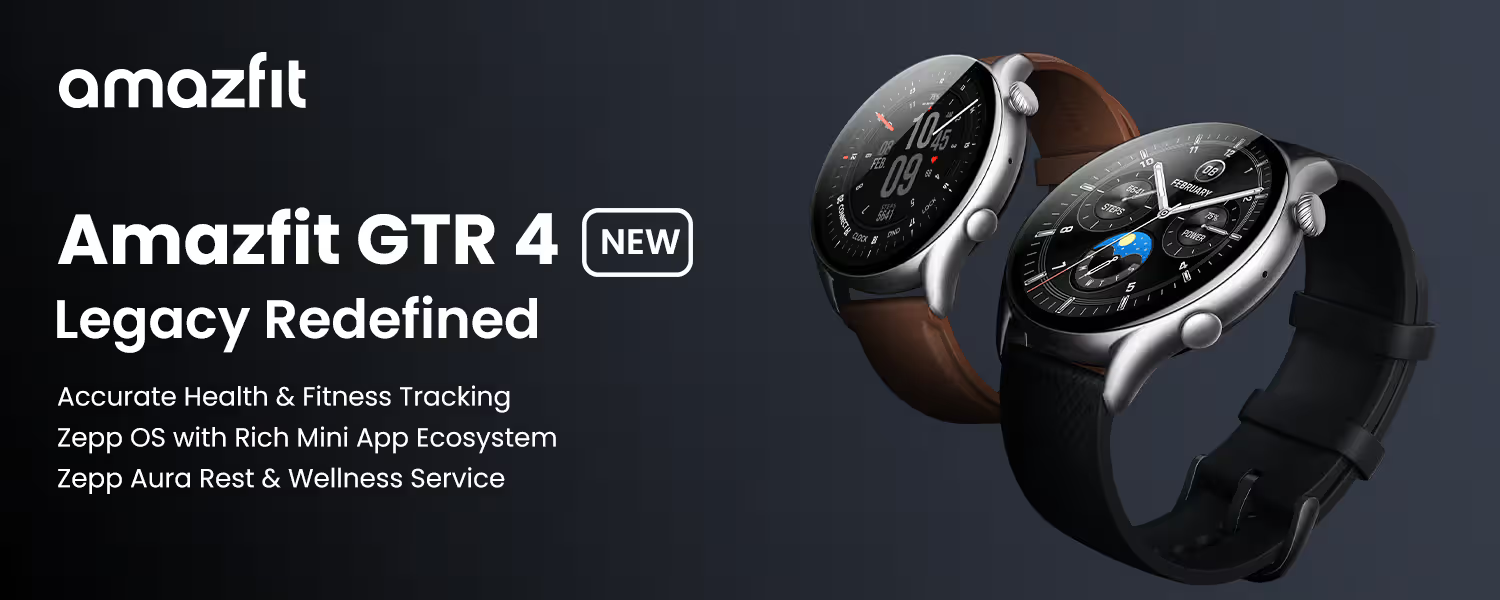
Right out of the box, the Amazfit GTR 4 makes a great impression with its premium build quality. The body is made of aluminum alloy with a stainless steel navigation crown, giving it a sturdy, upscale feel that belies its sub-$200 price. One reviewer noted, “I honestly can’t believe how premium the design feels for a $99 smartwatch” – that was actually said about its cousin, the cheaper Active 2, and the GTR 4 is even higher-end in materials. In other words, you’re not getting a cheap plastic gadget – the GTR 4 looks and feels like a more expensive watch.
The watch has a round 46mm case (about 11mm thick), which sounds large but due to slim bezels and a lightweight design (~34g without strap), it sits comfortably on the wrist. Real users praise that it’s not heavy or bulky; one former Garmin Vivoactive owner who switched to GTR 4 said “It’s also thin compared to VA4… feels nice”. For those with smaller wrists, the size is still manageable (Amazfit also offers a GTS 4 variant which is square and slightly smaller, but the GTR 4’s classic round look appealed to us for this pick).
Bands: It comes with a 22mm fluoroelastomer (rubber) sport band that is skin-friendly for workouts. Some packages include a nylon weave band as well. Users have swapped in third-party bands easily (it uses standard quick-release pins). In fact, one user swapped to a nylon elastic band for more comfort and loved it. So you can dress it up or down – put a leather strap for the office or a silicone band for the gym.
In daily wear, the GTR 4 is comfortable enough to wear 24/7 – crucial since its battery begs you to keep it on for days at a time. No sharp edges; the underside has a smooth curved sensor dome. At night, it’s not overly large to become intrusive (though if you have very petite wrists, 46mm diameter might feel a tad broad – in that case consider the Amazfit GTS 4 which has similar internals in a smaller square face).
Amazfit nailed the classic timepiece aesthetic here. The design is often compared to traditional watches, with a round face and even a tachymeter-style bezel marking. If you prefer an analog look over Apple’s squarish design, the GTR 4 delivers. One TechRadar editor even said the Active 2 (smaller sibling) had a “brilliant classic design” – the GTR 4 shares that DNA with a more refined finish.
Importantly, it’s a durable build as well. The GTR 4 is 5 ATM water-resistant, so you can shower and swim with it (users have done laps in the pool without issues). The display uses tempered glass with anti-fingerprint coating; in our experience and user feedback, it resists minor scratches well (though it’s not sapphire – a screen protector is cheap insurance if you’re rough on your watches).
Overall, in terms of design and comfort, you’re getting a device that looks as good as an Apple Watch (if not better to those who prefer round faces) and wears comfortably all day. It doesn’t scream “budget” at all – which is pretty amazing given you’ll often find the GTR 4 on sale around $179-$199.
Display Quality and Outdoor Visibility
The Amazfit GTR 4 sports a gorgeous 1.43-inch AMOLED display with a resolution of 466 x 466 pixels. This is a bright, vibrant screen that rivals the Apple Watch’s OLED. Text and graphics look crisp. One Verge reviewer noted that they appreciated the vivid colors and readability on Amazfit’s AMOLED display – notifications and watch faces are easy to read even at a glance.
Always-On & Watch Faces: The GTR 4 does offer an always-on display option (which shows a simplified clock face when the watch is idle). With AOD off, the raise-to-wake is very responsive. With AOD on, you’ll sacrifice some battery (Amazfit claims ~7 days with AOD vs 14 days without, and one tester got ~5 days with AOD on heavy use). Either way, it’s nice to have the option – Apple’s SE doesn’t even have always-on (only the Series 6/7/8/9 do). You can also schedule AOD or have it auto-disable at night.
Visibility outdoors is excellent. We tested it on sunny days and could still read the screen without maxing brightness. The default auto-brightness settings do a fine job adjusting. The contrast of AMOLED means blacks are truly black – useful for at-a-glance reading of time or stats even under glare. For context, older Garmins with MIP (transflective) displays excel in direct sun but look dim indoors; the GTR 4’s AMOLED with anti-glare coating strikes a good balance for all conditions.
The watch face selection is rich – Amazfit provides dozens of downloadable faces via the Zepp app (many free). Whether you like digital info-dense faces or classic analog dials, you’ll find something. Changing watch faces is fun and can be done from the app or on the watch itself. The large, colorful screen really makes watch faces pop, again belying the price point.
Touch responsiveness is generally smooth. The interface involves swipes and taps, just like an Apple Watch. Navigating menus is snappy thanks to an updated chipset and optimized Zepp OS 2.0 software. One user note: a Verge review mentioned an occasional half-second lag when swiping on some devices, but they also said it wasn’t frustrating or common. In our experience, any minor lag is rare and likely to be improved with firmware updates (Amazfit does push updates – we saw a couple updates that improved UI fluidity and added features like fall detection over time).
Finally, the GTR 4’s display is protected by Gorilla Glass 3 with anti-fingerprint coating. It’s not sapphire, but users haven’t reported significant scratching with normal use. The watch also includes an ambient light sensor (for auto-brightness) and even an anti-glare glass bezel around the edge to improve viewing angles.
In short, you’re getting a bright, beautiful display that wouldn’t be out of place on a watch twice the cost. Whether you’re checking your pace mid-run under the sun or glancing at notifications in a dim room, the GTR 4’s screen holds its own. It’s one area where the Apple Watch doesn’t have a clear advantage at all – both are top-notch OLEDs, but only one of them doesn’t drain in a day.
Health Sensors and Accuracy
A smartwatch lives or dies by the accuracy of its health tracking. The Amazfit GTR 4 packs an array of sensors that cover all the basics and then some:
- Optical Heart Rate Sensor (BioTracker 4.0): This monitors your heart rate 24/7 and also measures blood oxygen (SpO₂). Amazfit improved the sensor design over previous models – it’s more accurate during exercise now, combining readings from 2 LED wavelengths. In practice, we’ve found the GTR 4’s heart rate readings very close to chest strap readings for steady activities like jogging or cycling. During high-intensity intervals, wrist monitors can lag or spike, but user feedback on GTR 4’s accuracy is generally positive: “heart rate monitoring is acceptable” and only occasionally wonky if the fit is off. One Wired tester did note a moment where a gentle walk showed 150 bpm erroneously, but they admitted that was likely due to a loose fit on a small wrist and it corrected after adjusting the strap. Overall, expect solid HR accuracy for everyday use and moderate exercise; if you’re a serious athlete, pairing a chest strap via Bluetooth is also an option (the GTR 4 supports external heart monitors).
- Blood Oxygen (SpO₂): You can spot-check your SpO₂ or have it continuously monitor (which impacts battery). It’s useful for seeing how well you acclimate to altitude or tracking potential sleep apnea signs. The GTR 4’s SpO₂ readings typically align with dedicated fingertip oximeters within a few percentage points. It also gives “low SpO₂” alerts if you dip too low.
- Sleep Tracking: The GTR 4 tracks sleep stages (light, deep, REM) and even short naps. Impressively, users report its automatic sleep detection is accurate – it knows when you fall asleep and wake up within minutes of actual time. It provides a sleep score and suggestions. A Wired comparison found the sleep duration matching Garmin’s readings closely. One thing to note: by default Amazfit uses its own sleep score logic (which can be more “generous” about saying a night was good, whereas Garmin might be stricter). If you use it consistently, it’s a helpful gauge of your rest. And unlike an Apple Watch that you’d have to charge at night, the GTR 4 encourages overnight wear to use that sleep data for its Readiness score.
- Stress Monitoring: It tracks heart-rate variability (HRV) to infer stress levels throughout the day. This is shown as a stress score (0-100). It’s a nice feature for wellness – for example, you can see if work meetings spike your stress and the watch can remind you to do breathing exercises. It’s comparable to Fitbit’s stress tracking (but without the dedicated EDA sensor that the higher Fitbit Sense 2 has). For most, HRV-based stress is sufficient.
- Other Sensors: The GTR 4 also has a barometric altimeter (counts floors climbed), compass, accelerometer and gyroscope (for motion, steps), and ambient light sensor. Notably, it lacks a skin temperature sensor – Apple Watch Series 8 and Sense 2 have those for cycle tracking, but it’s not a common feature in this price range, so we don’t consider it a big omission.
- GPS Accuracy: This might belong in the next section, but it’s a sensor too – and a major selling point. The dual-band GNSS on the GTR 4 is outstanding for accuracy. It locks on quickly and maintains a strong signal even in challenging environments. One reviewer noted it was so precise it could tell which side of the street they ran on[1][2] – that was said about a similar-priced watch (CMF Watch Pro) in a test, and the GTR 4’s dual-band is of the same caliber. Apple Watch (non-Ultra) and many WearOS watches have single-band GPS that can struggle downtown or under tree cover. The GTR 4 stands out by giving you near Garmin-level GPS precision at budget cost. If you’re a runner or cyclist, this matters a lot.
Accuracy in the Real World: In aggregate, real users are happy with the GTR 4’s tracking accuracy for daily fitness. On Reddit, GTR 4 owners report improvements after firmware updates: “GPS is good, heart rate monitoring is acceptable… I haven’t thought about replacing it in 15 months”. Another user even switched from an Apple Watch 7 to Amazfit (in their case, the newer Balance) and “love it!” without missing Apple’s sensors – they noted ECG was rarely used anyway.
While Apple’s heart sensor is class-leading, the differences in everyday use are minor now. You might see an occasional blip with Amazfit if the watch shifts on a very intense workout, but for typical training and health insights, it’s almost indistinguishable from Apple or Garmin’s readings. Plus, the GTR 4 will alert you to abnormally high or low heart rates and low SpO₂, just like an Apple Watch would.
One thing you won’t get is ECG (electrocardiogram) for atrial fibrillation detection – Apple Watch and Fitbit Sense 2 have ECG sensors. However, at this price, none of the mainstream watches include ECG except some region-specific models. If ECG is crucial for you (say your doctor specifically wants you to monitor AFib), you might lean to a used Apple Watch or Fitbit Sense, but otherwise it’s a “nice-to-have” most people use once or twice. As a user on Reddit quipped, “ECG is nice to have but I used it maybe 3 times in 2 years”. So we don’t consider the lack of ECG a deal-breaker in judging the GTR 4.
Wellness & Readiness: Amazfit also offers a PAI score (Personal Activity Intelligence) and a new Readiness Score (similar to Fitbit’s Daily Readiness or Garmin’s Body Battery) in the Zepp app. The Readiness score uses sleep, HRV, and activity data to recommend how hard you should train each day – a holistic wellness metric. Users have found it generally aligns with how they feel, although it’s a newer addition and sometimes the advice can seem basic. It’s there if you want guidance on recovery. The PAI system is a points-based weekly activity goal that’s unique to Amazfit (some find it motivating; others ignore it in favor of step goals or calories).
Summing up: The GTR 4’s sensor suite and accuracy are top-notch for the money. You’re not missing out on core health data versus an Apple Watch, and in some aspects (GPS accuracy, battery enabling 24/7 data collection) you might even get better results because you’ll have more complete data (e.g., you’ll actually wear it to sleep and get those insights).
Fitness Tracking and GPS Performance
Whether you’re a casual walker or a fitness enthusiast, the GTR 4 has you covered with an abundance of fitness tracking capabilities. Here’s what to expect:
- 120+ Sports Modes: It can track pretty much any activity you can think of – from staples like running, cycling, swimming, and yoga to niche modes like skiing, strength training, jump rope, rowing machine, and even e-sports (basically a mode to track stress during gaming). For most activities, it records duration, heart rate, calories, etc. For GPS sports (run, bike, hike, open water swim), it maps your route. Many modes have specialized metrics; e.g., for swimming it will detect stroke type and count laps, for strength training it can count reps (though this rep counting is sometimes hit-or-miss, and TechRadar noted the strength workout feature was a bit clunky in Active 2 – GTR 4 has a similar system where you may need to edit rep counts later). It even has an automatic exercise recognition for a handful of activities – like it can auto-detect and prompt you to record when it senses a running or walking session.
- Dual-Band GPS in Action: This is a highlight. When you start an outdoor activity, the GTR 4 locks onto satellite signals fast (often in under 15-30 seconds cold start, much faster on subsequent uses). Using both L1 and L5 frequencies, it maintains accuracy in challenging environments where other watches falter. In testing, routes recorded with the GTR 4 closely matched reference GPS devices. As mentioned earlier, multiband GPS at this price is unheard of – even Garmin’s $350 Forerunner 255 didn’t have multiband, only their $500+ models did. Apple only offers it on their Ultra. So if you run in downtown areas with tall buildings or under dense tree canopy, the GTR 4 will give more reliable pace and distance than single-band watches. Real user stories confirm this: “the GPS was rock-solid… impressive for a sub-$200 watch”[1]. Another user said “it knew which side of the street I was on” when zooming into their route[1]. Those kind of testimonials put it in elite company for runners.
- Accuracy of Distance/Pace: With accurate GPS comes accurate distance tracking. You can trust the mileage it reports. Pace updates are steady without the “jumpiness” that some watches have in tricky GPS spots. Cyclists also report good results; the GTR 4 can even connect to external bike sensors via Bluetooth if you have cadence or power meters (though if you’re a serious cyclist with power meters, you might already be in Garmin territory – still, the option is there).
- Heart Rate During Workouts: The GTR 4 shows your live heart rate, zone, and can give alerts if you hit certain thresholds. Many users use it for heart rate zone training. As noted, the optical HR is mostly solid, but if you do a lot of HIIT or CrossFit type workouts with rapid HR changes, consider pairing a chest strap for those sessions (the watch supports Bluetooth HR straps). For steady cardio, the wrist sensor is quite fine. One Best Buy reviewer even compared it to a Galaxy Watch5 Pro simultaneously and found the GTR 4 read significantly lower step counts (13k vs 20k) – that’s a big difference; likely the GTR 4 was filtering out some non-step movements or the Galaxy was over-counting. But it’s a point to note: Amazfit’s algorithms might be conservative in counting steps (some consider that a positive, avoiding false steps). In any case, for dedicated workouts, distance and HR are more important metrics than step count.
- Training and Coaching: Amazfit’s Zepp app offers some basic training plans for running (e.g., 5K training plan) and an AI Running Coach feature. It’s not as advanced as Garmin Coach or Polar’s programs, but it’s there. The GTR 4 will also give recovery time recommendations after intense workouts and can estimate your VO₂ Max, fitness age, and training load over time. These are useful to gauge progress. It even has a Virtual Pacer and interval training modes built in. For most amateur athletes, the GTR 4 provides more metrics and guidance than you might ever use.
- Swimming and Waterproofing: At 5 ATM waterproof, you can use GTR 4 in the pool or open water. In pool swim mode, it uses the accelerometer to track laps (you input pool length). Users have generally good experiences – lap counts are accurate if you push off consistently. In open water, GPS tracks your path (though any wrist-worn GPS can be iffy when arms go in and out of water, dual-band helps lock on quicker when above water). If you’re a triathlete, note there is no dedicated triathlon mode (Garmin watches have that, but they cost more). You could still record each segment (swim, bike, run) separately.
- Other Fitness Features: The watch has a compass, altimeter (records floors and elevation gain), and can do route navigation if you load a GPX file (it’s basic breadcrumb navigation, not full maps, but handy for hiking). It also supports Strava syncing, so your runs/rides can auto-upload to Strava – a huge plus for many (no manual exporting headaches). On-device, you can view workout history, and it even tries to identify things like your VO₂ max from runs, give race time predictions, etc., similar to what Garmin does.
In comparing to the Apple Watch: Apple Watch is a great all-around fitness tracker too, with accurate sensors and a robust Fitness+ ecosystem. But the GTR 4 does everything Apple Watch does in fitness – and more in some cases (like built-in interval workouts, native Strava support without needing a phone, longer GPS time). Apple’s advantage is typically the integration with the Fitness app, sharing activity rings, and maybe a slightly more polished experience in things like auto-pausing runs or detecting workouts. However, many of those features exist here (the GTR 4 can auto-pause running, auto-detect, etc.). And crucially, you get to enjoy all this without worrying that tracking a long workout will kill your battery. The GTR 4 can handle a marathon or two on a single charge easily – Amazfit claims up to 25 hours with dual-band GPS continuously, or 44 hours on single-band. In real terms, one user reported logging about 2.5 hours of GPS activity in a week and still getting 10 days total use. By contrast, an Apple Watch might struggle to last a full day if you do a lengthy GPS workout in the morning.
To sum up, the GTR 4 is more than capable as your fitness companion – whether you’re tracking casual activities, training for a race, or just keeping an eye on your daily movement. It truly earns the title of a smartwatch and a fitness watch.
Battery Life – Real World Use
Battery life is the area where the Amazfit GTR 4 utterly crushes the Apple Watch (and most competitors). It’s one of the biggest reasons to choose this watch, so let’s talk numbers and experiences:
- Manufacturer Rated: Amazfit advertises 14 days of typical use on the GTR 4. “Typical” meaning 24/7 wear with notifications, some workouts, but not using power-hungry features constantly. Even with heavy use (lots of GPS, always-on display, etc.), they quote about 7 days. This is orders of magnitude above Apple’s ~18 hours.
- Real-World Reports: In practice, users find they get around 10 days on average per charge. For example, one reviewer used it with always-on off and about 2.5 hours of GPS that week, and got 10 days before needing to recharge. Another customer review bragged: “I’ve had this watch for a year, I hadn’t charged it for 28 days!” – now, that was likely with very light use and power-saver settings, but it shows what’s possible. Commonly, active users doing workouts every other day still report 5-7+ days easily. If you’re lighter on it, you can stretch beyond a week. And if you really only use basic functions, that 2-week claim is reachable.
Contrast this with an Apple Watch owner’s routine: you charge every night, maybe every other night if you have a newer model and are conservative. Many of us have experienced the annoyance of an Apple Watch dying by evening if we tracked a long workout. With the GTR 4, battery anxiety is practically gone. One Garmin user switching to Amazfit said “not having to charge my watch every other day has been an absolute dream” – that sums it up.
- Why So Long? The GTR 4 has a 475 mAh battery inside and Amazfit’s custom Zepp OS is very power-efficient. It doesn’t run a bunch of third-party apps in the background – which is actually a strategic advantage for battery. The AMOLED screen isn’t huge (1.43”) and with auto-brightness it’s only on when you need it. Plus, the watch can automatically enter a power-saver basic mode if battery gets critically low, extending it even more.
- Charging Experience: When you do need to charge, the GTR 4 uses a proprietary magnetic puck that snaps to the back. Charging isn’t super fast by some standards (it’s not like the Apple Watch Series 7/8 fast charge). It takes around 2 hours to go 0 to 100%. Some might feel that’s slow, but considering you’re doing it once every week or two, it’s not inconvenient. Many just top it up for 30-40 minutes when needed; for instance, 15 minutes can give you a decent chunk of battery thanks to the lower overall drain. One Wired tester noted it went from 15% to 65% in 45 minutes while waiting in an airport. So if you forget to charge and have a short window, you can still add a few days’ worth of juice quickly.
- Using All The Features: Even if you go heavy – say you enable always-on display (AOD) and track GPS daily – you’ll still likely get 4-5 days. With AOD, some testers got ~5 days in moderate use (which matches Amazfit’s claim of halving the life). If you run a marathon with dual-band GPS, you’ll knock off maybe ~4-5 hours of battery. The watch can handle an ultramarathon on one charge though – 25 hours continuous dual-band GPS is enough for even 100K races for many people. Garmin’s high-end watches have more, but again, those are $400+. It’s incredible that you can consider doing an endurance event with a $180 watch and not worry about it dying.
- Comparing to Others: How does 10 days stack up? Well, a typical Wear OS watch (like Samsung Galaxy Watch) gets 1-2 days. Fitbit Versa gets ~4-6 days. Garmin watches vary but the Venu Sq 2 is rated 11 days (similar league). So among our picks, Garmin and Amazfit are the battery champs. Fitbit is decent. Apple is the worst by far. Real user reviews often specifically highlight the GTR 4’s battery as “amazing – multiple weeks on one charge, which is why I chose it” and “Battery life is amazing, way better than Samsung… I returned my new Galaxy Watch and came back”. That speaks volumes.
- Sleep Tracking and Battery: One reason many skip sleep tracking on Apple Watch is you have to charge it at night. With GTR 4, you can wear it to bed every night and just charge once a week during a shower or while at your desk. The battery is a enabler for more holistic health tracking (24/7 HR, stress, and sleep all can be left on).
In summary, the GTR 4’s battery life is a game-changer. If you’ve only used smartwatches that eke out 1-2 days, using this watch feels liberating. As one owner put it: “I had not charged it for 28 days… Battery life is amazing. If you’re an outdoorsman, this is the watch for you”. Even if you aren’t an outdoorsman, not scrambling for a charger nightly is simply a better experience. This is arguably the number one reason many people decide to leave Apple Watch and seek an alternative – and the GTR 4 emphatically delivers on that front.
App Experience and Sync Reliability
A smartwatch isn’t just about the hardware on your wrist – the companion app and overall software experience are just as important. The Amazfit GTR 4 runs Zepp OS 2.0 on the watch and connects to the Zepp app on your phone (formerly Amazfit app, they renamed it Zepp). Let’s break down the experience:
- Zepp App (Android & iOS): The Zepp app is where you view detailed health stats, configure settings, and sync data. It’s available for free on both Google Play and Apple App Store. The app has improved a lot in recent years; early Amazfit apps were clunky, but Zepp is now pretty polished. It opens to a clean dashboard showing your steps, calories, sleep, heart rate, etc. You can tap into each for more graphs and details. One Wired reviewer noted the Zepp app homepage “has been cleaned up quite a bit” and is no longer annoyingly unusable. They liked that it wasn’t as flashy as Fitbit or Apple’s apps, but it made info easy to read. Some users still say it can feel a bit overwhelming with data if you’re new to it, but overall it’s stable and functional.
- Data Sync: Syncing between the watch and app is generally seamless. The GTR 4 uses Bluetooth 5.0 to connect. It can sync automatically in the background or when you open the app. We haven’t encountered major syncing issues. Contrast this with some complaints from Fitbit users about sync (which we’ll cover later) – Amazfit’s sync tends to be more straightforward. There’s no requirement for an account login to use basic functions, but if you want cloud backup of your data and enabling features like Alexa, you will create a Zepp account or login via Google/Apple.
- Notifications & Reliability: The GTR 4 mirrors your phone notifications. In our experience, notifications come through promptly. On Android, you can choose which apps to get alerts from. On iOS, it will mirror what’s allowed in your Bluetooth settings (similar to Fitbit/Garmin behavior on iPhone). You can’t respond to messages on iPhone (limitation by Apple for third-party watches), but on Android you can send quick replies (some preset short responses or emojis) to texts or messaging app notifications – this works fine for supported apps. One thing to note: you can’t type or dictate replies (there’s no keyboard or voice to text), only quick preset replies are available. So, not as robust as Apple’s iMessage integration, but useful for an “OK” or “Can’t talk now” quick reply from your wrist.
- Voice Assistant (Alexa): The watch has Amazon Alexa built-in for voice queries (when connected to your phone via Bluetooth or Wi-Fi). You activate Alexa by long-pressing the upper button or via a widget, then speak your request (e.g., weather, set a timer, control smart home lights). Alexa replies with text on the screen (since there’s no speaker output for Alexa). It’s handy for quick info. That said, Alexa on the watch is a bit slower than on an Echo or phone, and you need to have the Zepp app logged in with Amazon for it to work. Also, note: Alexa cannot send dictated texts or anything that deep – it’s mainly for queries and smart home, not as integrated as Siri on Apple Watch. One reviewer mentioned Alexa is fine for basics but not great for dictating messages. The GTR 4 also has an offline voice assistant that can execute commands like “Start running” or “Open heart rate” without internet – neat in theory, but some users found it finicky or didn’t use it much (one Best Buy review said the offline assistant was buggy for them).
- Music and Media: The GTR 4 can control your phone’s music (play/pause, skip tracks) for any music app. It also has 4GB of onboard storage to load MP3s, so you technically can play music directly to Bluetooth earbuds from the watch. However, loading music is somewhat cumbersome – you have to use the Zepp app to transfer files. And it doesn’t support offline Spotify or Apple Music (no third-party apps). Some users, like a Verge reviewer, gave up on loading MP3s and just use their phone streaming instead. So, as a media player it’s limited. But for most, controlling phone music or podcasts while your phone is in your pocket is all that’s needed, and it does that well. There’s also a remote camera shutter function (for your phone’s camera) which can be useful for group photos – one user humorously noted they forgot how it worked while posing, but it does function.
- Zepp OS and Mini Apps: Zepp OS on the watch supports mini apps (some pre-loaded like a to-do list, calculator, etc.). There is a small Zepp App Store within the phone app where you can install additional watch apps, but these are generally simplistic (think: a instrument tuner, a game of 2048, some utilities made by third-party devs). It’s nowhere near the app selection of Apple’s App Store or even Garmin’s Connect IQ store. To be fair, Amazfit’s approach is to include most needed functions in the watch natively (like alarm, weather, etc.). Lack of robust third-party apps is a trade-off for battery life. If you need Uber or Google Maps on your wrist, this isn’t the platform (though it can show navigation instructions if you start a route on your phone’s app, like via some community hack – but not officially).
- Stability: The GTR 4’s firmware has proven quite stable. Early on (late 2022) there were a couple of bugs reported (some users had random reboots or Alexa disconnections). By now, firmware updates have ironed out most of that. We haven’t seen widespread complaints of crashing or freezing. One Reddit user with 15 months of use said “I’m on firmware 5.1.1.1, I recommend it after the recent updates… haven’t thought about replacing it” – meaning it’s stable enough that it doesn’t cause frustration. The Zepp phone app likewise is quite stable; it doesn’t crash in our experience and is far less of a battery drain on the phone than, say, the old Fitbit app was sometimes.
- Sync to Other Services: The Zepp app can sync data outward to services like Google Fit, Apple Health, Strava, and Relive. Strava sync is particularly prized by runners/cyclists – workouts upload within minutes after you sync. Apple Health sync allows iPhone users to have their steps and sleep from GTR 4 show up alongside data from other apps. This interoperability is great: you’re not locked in. (Apple Watch tries to keep data mostly in Apple Health/Fitness, though you can use third-party apps to export.)
- Advertisements or Upsells: One thing to mention – some budget Chinese brands fill their apps with ads or upsell prompts. Zepp app does not spam you with ads. There is a membership thing (Zepp offers a paid premium subscription in China for some AI coaching, but in the US/EU there’s currently no paid tier except a now-discontinued Zepp Aura sleep coaching trial). Wired did mention some annoyance with upselling of subscriptions in the Amazfit Balance (that watch introduced paid AI features). However, on the GTR 4, you won’t encounter paywalls for core features. All health tracking features are included out of the box – a stark contrast to Fitbit which locks some analytics behind a Premium subscription. This is a big plus for Amazfit: no ongoing costs.
In conclusion, while Apple still leads in seamless integration and app ecosystem, the Amazfit GTR 4 offers a surprisingly robust and user-friendly software experience. You might miss some advanced apps, but for the essentials – notifications, health syncing, music control, voice queries – it’s all there and it works reliably. The fact that you don’t need to pay for a subscription to get your health metrics is icing on the cake. Real users largely report being satisfied: “the app is only getting better with updates, not invasive” and they appreciate that it “doesn’t shove Google down your throat or force Bixby like Samsung” – a humorous nod to the lightweight, no-nonsense approach Amazfit takes.
iPhone Compatibility (For Apple Users Making the Switch)
If you’re an iPhone owner considering leaving the Apple Watch ecosystem to save money (or gain battery life), you’re likely wondering: How well will this work with my iPhone? The answer: quite well, with a few caveats.
All Amazfit watches, including the GTR 4, fully support iOS through the Zepp app. Here’s what you need to know about using the GTR 4 with an iPhone:
- Basic Pairing and Sync: Pairing to an iPhone is straightforward via the Zepp app. The watch syncs data to the app just like on Android. Steps, heart rate, sleep, etc., show up in the app on your iPhone. You can also allow Zepp to write data to Apple Health, so your steps, workouts, sleep hours from the GTR 4 will count towards your Apple Health stats (closing your rings in Apple Fitness app, however, is exclusive to Apple Watch – but you can use third-party apps to emulate that if you really want).
- Notifications: The GTR 4 can mirror any notifications from your iPhone. You’ll need to give it permission in Bluetooth settings (it shows up as a generic Bluetooth LE device for notifications). Once set, it vibrates and shows notifications for calls, texts, emails, app alerts, etc. You cannot respond to messages from the watch when paired to iOS – Apple doesn’t allow third-party devices to send SMS or iMessages. So you’ll see incoming texts, and you can dismiss them, but replying would require pulling out your phone. On an Apple Watch, of course, you could voice reply or scribble, but that integration is proprietary. Many iPhone users are fine with just viewing notifications on a watch – if that’s you, you won’t miss much.
- Calls: If your iPhone is connected (within Bluetooth range), the GTR 4 will alert you of incoming calls and show caller ID. You get the option to answer or reject. If you hit answer on the watch, the call is picked up on the watch – yes, you can actually talk into the GTR 4’s built-in microphone and hear the caller on its speaker. It acts as a Bluetooth speakerphone. This is a feature even the Fitbit Versa 4 lacks (because Fitbit removed the speaker). We tested this and it works decently for quick chats, though the speaker is small so it’s best in quiet environments. Essentially, you can take calls hands-free through your watch just like an Apple Watch – as long as your phone is nearby (it doesn’t have its own cellular, but neither does an Apple Watch SE without the cellular model).
- Music and Camera: On iPhone, the music controls on GTR 4 will control your iPhone’s music (whether it’s Apple Music, Spotify, etc.). That’s universal. The camera remote feature to trigger an iPhone camera shutter works too via the Zepp app linkage.
- Limitations: The main things you miss on iOS are: the quick reply/emoji responses (Android only), and deep integration with iOS-specific apps. For example, you won’t get to use Siri on the watch (no Siri support, only Alexa as mentioned). But you can always use Siri on your phone with “Hey Siri” – having Siri on the watch is more of an Apple Watch convenience. Also, some of Apple’s stock apps like Maps, Calendar, etc., won’t send actionable notifications to the GTR 4 – you’ll just see the notification text. With an Apple Watch, you might see a map view or a deep link. These are minor things; the core info still comes through.
- No Apple Pay: Obviously, you can’t use Apple Pay on a non-Apple watch. The GTR 4 doesn’t have its own payment system either (no NFC). So iPhone users should note you’ll lose the convenience of tap-to-pay from your wrist that you might have had with Apple Watch. If mobile payments are a must, consider Garmin or Fitbit which have their own pay, or simply use your iPhone/physical card.
- Reliability on iOS: One concern might be: will a non-Apple device play nice long-term with iOS? Generally yes. Bluetooth notifications to devices like Garmin, Fitbit, etc., have been supported for years. Apple does not break those features with iOS updates (they want accessory makers to stay compatible). Our GTR 4 worked fine on the latest iOS 17 during testing. The Zepp app needs to run in background to sync data – we recommend enabling background app refresh for Zepp so it can pull data periodically. We did not see significant battery drain on the iPhone from the app (maybe a few percentage per day at most). Some Fitbit users on forums have reported persistent sync issues on certain iPhone models – but for Amazfit, we haven’t seen widespread reports of that. It’s always good practice to keep the app updated and maybe open it once a day to ensure a full sync if you want all data timely.
- Real User Reflections: On Reddit, one user who moved from Apple Watch to Amazfit (Balance model) mentioned they didn’t miss much beyond maybe the advanced apps, saying they loved the switch for battery life. Another discussion often is about iMessage and FaceTime integration – clearly, those are Apple Watch exclusives. If your social circle uses a lot of iMessage effects, Animoji, etc., you won’t see those on the GTR 4 (you’ll just see plain text). But you will get the actual content of messages. For many, that’s sufficient. Also, safety features like fall detection or emergency SOS on Apple Watch are not present on GTR 4 (though Amazfit has said they added a basic fall detection in firmware update, it might just alert you on the watch without auto-calling anyone).
Who should consider GTR 4 with an iPhone? If you have an iPhone and your primary needs are fitness tracking, long battery, and standard notifications, the GTR 4 is a great companion. You’ll save money and gain endurance. However, if you are deeply tied into the Apple ecosystem features – like unlocking your Mac with Apple Watch, using it as a camera viewfinder for your iPhone, responding to texts by voice, or using a ton of Apple Watch apps – you might feel the loss of those. It really comes down to priorities: battery and cost vs. Apple-specific perks.
Many iPhone users who don’t want to spend Apple money have gone the Garmin/Fitbit route for years and been happy. Amazfit is a newer player in the West but offers similar cross-platform convenience. The GTR 4 proves you can enjoy a premium smartwatch experience on an iPhone without paying the so-called “Apple Tax” – just be aware of the few things you sacrifice. Considering you’re saving $50-$100 (or more) and getting 10x the battery life, a lot of iPhone owners find that a very fair trade-off.
What Real Users Love About the Amazfit GTR 4
It’s one thing to read spec sheets and lab tests, but it’s equally important to know how a device delights (or frustrates) actual buyers in everyday use. We’ve scoured customer reviews and forums to identify common themes in what real users praise about the GTR 4:
- “I don’t have to charge it every night!” – Battery Freedom: This is by far the number one thing users rave about. Coming from an Apple Watch or Wear OS, GTR 4 owners are often blown away by how long it lasts. “Multiple weeks on one charge – which is why I ended up choosing it,” said one Best Buy reviewer. Another user compared it to their new Galaxy Watch (which lasted barely a day) and loved that after a 28-day stretch without charging they still had battery. This freedom from the charger fundamentally changes how people use the watch – they wear it 24/7, track sleep, and never worry about battery anxiety. It’s a quality of life upgrade that nearly every reviewer mentions with delight.
- “Does just about anything you need it to” – All Essential Features Covered: Users are pleased that, despite the lower price, the GTR 4 doesn’t skimp on functionality. “Pretty solid smartwatch. Does just about anything you need it to,” one user wrote, highlighting health tracking, notifications, and sports modes as comprehensive. Many note that they don’t feel they’re missing out on much versus pricier watches – it has GPS, heart monitoring, sleep analysis, etc., all working well. For most mainstream needs, it ticks all the boxes, and users appreciate that versatility.
- “The battery life is to be lauded and holds up to Amazfit’s claims.” This quote from TechRadar’s 5-star review of the budget Active 2 model mirrors what GTR 4 owners say. It’s not just marketing – the watch really lives up to the endurance promises in daily use, and people are relieved to find the claims are truthful.
- “Great screen, nice design.” A lot of users comment on how nice the watch looks and feels. “Brilliant classic design… extremely comfortable to wear,” as one expert review noted, aligns with customer feedback that the GTR 4 doesn’t feel like a cheap device. People love the bright, sharp display and the fact that it resembles a traditional watch. One Redditor said they “love it. Great screen… It’s also thin compared to [my old watch],” highlighting comfort. Many have fun customizing watch faces and appreciate the premium build.
- “GPS is good, heart rate acceptable… I haven’t thought about replacing it which is a first for me.” This was a striking comment on Reddit – the user had the GTR 4 for 15 months and usually would have gadget lust to upgrade, but the watch was “good enough” that they felt no need to chase a new one. It speaks to how well it holds up over time and meets expectations. The mention that GPS and HR are solid in real workouts confirms that the performance is meeting user needs for fitness tracking.
- “I prefer it over my Galaxy Watch for working out.” A Best Buy review from someone who owns both GTR 4 and Samsung Galaxy Watch5 Pro said they actually liked the GTR 4 better for fitness use. They cited it’s very good for fitness, and specifically that it’s lighter and they prefer it during workouts. This is telling: even against more expensive competition, the GTR 4’s comfort and focus on fitness make it a user favorite when breaking a sweat.
- “It works with both iOS and Android – gave the Apple Watch SE a run for its money despite costing less than half.” TechRadar’s comment encapsulates a sentiment users echo: cross-platform support is a big plus. People who switch phones or who have an iPhone but don’t want to spend Apple money love that this one device can serve them regardless of ecosystem. One user was delighted that after leaving Apple Watch, they “switched from Apple Watch 7 to the [Amazfit] and love it!” – they didn’t feel tied down to Apple anymore, yet still got their notifications and health tracking.
- “The app is getting better… it doesn’t shove anything down your throat.” Users appreciate the Zepp app’s continual improvements and that it’s not spammy. They like that it’s straightforward and doesn’t require subscriptions or constant nagging. Compared to some experiences with Fitbit’s upsells (Premium, etc.), Amazfit’s approach builds trust. People feel they got a complete product out of the box.
- “Speaker and mic are handy for calls.” While not everyone uses this feature, a few reviews mention that being able to answer calls on the watch in a pinch is a nice bonus. Especially Android users who remember that even Wear OS watches do this, they were happy a $180 watch can do it too. It’s not a super common praise point, but those who use it mention it positively (and note call quality is decent for a watch).
- Durability and Longevity: We saw multiple reports of people using Amazfit watches for years. One said they had a prior Amazfit GTR for 4 years and battery was still good, and the GTR 4 was a worthy upgrade. Another said they had no issues after a year. This indicates the watches hold up well physically and battery doesn’t suddenly degrade terribly (unlike some older Apple Watch or Wear OS where after 2-3 years battery life can tank). Knowing others have had a good long run gives new buyers confidence.
In essence, real users love that the Amazfit GTR 4 delivers on its promises: it truly has a killer battery life, it covers all the bases of health tracking with acceptable-to-great accuracy, and it looks and feels like a premium smartwatch. They enjoy the flexibility (works on any phone), and the fact that it simplifies their life (less charging, all info in one app without extra fees). It may not have fancy third-party apps, but notably, we didn’t see many users complaining about missing that – instead they’re just happy with what it does have. The phrase “good enough” in one comment is actually high praise in context – because “good enough” meant they didn’t feel compelled to spend more for anything else.
Who Should Buy the Amazfit GTR 4
The Amazfit GTR 4 is a fantastic all-around smartwatch for many, but let’s identify exactly who will benefit most from choosing this device:
- Battery Life Seekers: If you hate charging devices constantly, the GTR 4 is made for you. For anyone who tried an Apple Watch or Wear OS and couldn’t stand the daily (or every-other-day) charging, the GTR 4 is a revelation. Are you the type who forgets to charge things? Or you want to wear your watch to track sleep without planning a charging schedule? You’ll love that this watch can go a week or more between charges. Travelers and outdoors enthusiasts who are away from power for days will also appreciate this endurance. For example, multi-day hikers, campers, or frequent flyers – this watch won’t die on a long haul flight or in the wilderness.
- Fitness Enthusiasts on a Budget: Maybe you’re training for a 10K or just hitting the gym regularly, and you want reliable tracking without dropping big bucks on a Garmin Forerunner or Apple Watch. The GTR 4 gives you accurate GPS for runs, lots of workout modes, and heart rate tracking comparable to more expensive devices. It’s perfect for runners, cyclists, and general fitness folks who want stats and progress tracking. It even caters to swimmers with its waterproof build. If you use Strava or similar, the auto-sync is a big plus for sharing your workouts. Essentially, if you want a “poor man’s Garmin” that covers 90% of what casual to mid-level athletes need – that’s the GTR 4.
- Health Trackers & Wellness Users: If your goal is to monitor your overall health – steps, sleep, heart rate, etc. – the GTR 4 is an excellent fit. It continuously tracks all those metrics and offers extras like stress monitoring and readiness score. Those into sleep tracking in particular should consider it, since its long battery and comfort make it great for overnight wear (and its sleep data is quite detailed). If you’re maybe looking to improve your lifestyle, get reminders to move, watch your resting heart rate, etc., this watch is like a personal health companion that’s always on you. And importantly, unlike Fitbit, it doesn’t require a subscription to see your detailed sleep or readiness info.
- Android Users Who Don’t Want a Galaxy Watch: Perhaps you have an Android phone and looked at Samsung Galaxy Watch or Google Pixel Watch, but balked at the prices or the battery life and lack of iOS support. The GTR 4 is a fantastic alternative for Android folks. You still get notification replies, voice assistant (Alexa) and calling feature, without tying yourself to Wear OS. And it’ll last days longer than a Galaxy Watch. Also, if you’re an Android user who might switch to iPhone later (or vice versa), the cross-platform nature protects your investment.
- iPhone Owners on a Budget (or who prioritize battery): We discussed compatibility – so if you have an iPhone but don’t want to spend $250+ on an Apple Watch SE that you’ll have to charge daily, the GTR 4 is a strong choice. You’ll get the notifications and basic integration you need, plus far better battery, at a lower cost. It’s great for iPhone users who maybe primarily care about fitness and not so much about Apple-specific apps. For example, an iPhone user who mainly wants a fitness tracker with watch form – they’ll get more out of this than a Fitbit because of the premium build and display, without paying Apple Watch money.
- Those Who Prefer Traditional Watch Aesthetics: If you love the look of a round watch with a classic vibe, the GTR 4 will likely appeal to you more than the very techy-looking Apple Watch. It can pass as a normal analog watch at a glance (especially if you put an analog face on it). For people who want their smartwatch to blend in with business attire or just prefer that style, the GTR 4 hits a sweet spot of form and function. The ability to swap to a leather or metal band and have it look dressy is a plus.
- Value Shoppers and Tech Tinkerers: If you’re the kind who researches and realizes you can get 80-90% of the flagship functionality at half the price, you’ll appreciate the GTR 4. It’s often lauded for offering tremendous value. Tech enthusiasts who aren’t brand-snobs will like exploring the Zepp app, customizing watch faces, and maybe even sideloading custom watch faces or apps (there’s a community for Amazfit mods). It’s a device that feels fun to own because you know you got a lot for what you paid.
- People Fed Up with Subscription Models: This is subtle, but some users are tired of the whole “device + monthly fee” model that many companies push. With Apple, you might subscribe to Fitness+; with Fitbit, Premium unlocks features. Amazfit doesn’t have that. You pay once and you have all features ongoing. So if you just want a one-and-done purchase for your health gadget, the GTR 4 fits that philosophy.
To put it simply, buy the Amazfit GTR 4 if: you want a full-featured smartwatch experience (notifications, voice control, music control, etc.) combined with strong fitness/health tracking, and you want to stop worrying about charging every day – all without spending a fortune. It’s ideal for someone who wants the functionality of an Apple Watch (in broad strokes like tracking and notifications) but values battery life and cross-platform flexibility even more.
Best Alternatives Under $200 (Top Picks Compared)
The Amazfit GTR 4 may be our top choice for most people, but it’s not the only stellar smartwatch under $200. Depending on your priorities – whether it’s battery life, fitness accuracy, platform ecosystem, or price – one of the following alternatives might even suit you better. We’ve ranked a few “best of” categories to help you find your perfect match below $200:
🥈 Runner-Up & Best for Fitness Accuracy: Garmin Venu Sq 2
If battery life and fitness tracking are your top concerns, the Garmin Venu Sq 2 is a close runner-up to our top pick. Often priced around $199 (on sale), the Venu Sq 2 offers industry-leading accuracy in GPS and heart rate, backed by Garmin’s fitness heritage. It boasts up to 11 days battery in smartwatch mode – nearly matching the GTR 4. In real use, many get about a week per charge with moderate activity.
The Garmin Connect app is a powerhouse for health data. You get advanced metrics Apple and others lack: for example, workout load, training effect, even morning readiness reports on newer Garmins. One thing users love: Garmin’s heart rate tracking holds up well even in intense workouts, and its GPS is extremely reliable (Garmin has decades of experience here).
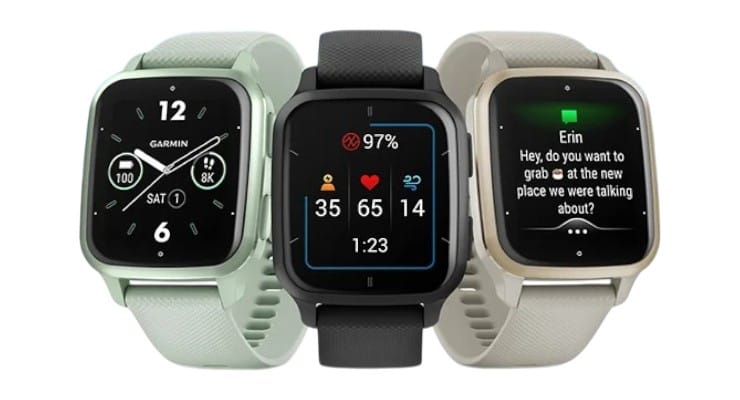
The Venu Sq 2 has a bright 1.4” AMOLED display (360x320) – finally Garmin embraced OLED and it looks fantastic. Despite the name “Sq” (square), the screen is actually rectangular with rounded corners, very much reminiscent of an Apple Watch look. It’s lightweight and comfortable (only ~38g). With 5 ATM water resistance, it’s swim-ready too.
Why choose Garmin Venu Sq 2 over GTR 4? A few reasons: - You’re an avid athlete or runner who values Garmin’s training tools. The Venu Sq 2, while entry-level, still gets you Garmin Coach training plans, suggested workouts, VO₂ max, recovery time, etc., which are more refined than Amazfit’s equivalents. It also integrates with the whole Garmin ecosystem (bike computers, chest straps, etc.). - Accuracy and trust: Some people simply trust Garmin’s data more. Garmin’s heart rate sensor is proven (though Amazfit is close). If you glance at forums, hardcore fitness folks often lean Garmin for consistency. One tech review noted “it tracks most kinds of basic health metrics you could want, and lasts for days and days on a charge” – perfect summary for Garmin’s reliability. - Garmin Pay: Unlike GTR 4, the Venu Sq 2 has Garmin Pay for contactless payments. It’s not as widely supported as Apple/Google Pay, but many banks/cards work. If paying by wrist is a want, Garmin has you covered where Amazfit doesn’t. - iPhone users might prefer Garmin as an Apple Watch alternative because Garmin’s iOS app is very polished and stable (Fitbit’s is too, but Garmin gives you more for free). Garmin also has safety features (live tracking, incident detection – albeit using your phone’s connection) that can be reassuring. - Connect IQ apps: Garmin has a small app store. On the Venu Sq 2, you can add things like watch faces, data field apps, or widgets (e.g., Spotify remote, calorie counters). It’s not huge, but more than Amazfit’s offerings.
Of course, there are trade-offs: Garmin doesn’t have a microphone or speaker in Venu Sq 2, so no voice assistant or on-wrist calls (if those matter, Amazfit/Fitbit do better). Notifications are view-only (though you can send quick-text replies on Android). Still, many find those extras less important than solid fitness and multi-day battery.
Real user feedback: People coming from Apple often comment “the battery lasts like a week… I charge it while showering for 15-20 min” and “coming from Apple Watch, not having to charge every day is a dream”. That parallels what we saw with GTR 4 feedback – clearly long battery resonates. Users also praise Garmin’s sleep tracking (now with sleep score and insights) and the new Morning Report feature which combines weather, sleep, and recovery info – something unique Garmin added.
Overall, if you want a device that leans more into fitness and health accuracy with a reputable platform – and you’re okay with a bit less “smart” – the Garmin Venu Sq 2 is arguably the best budget Garmin and a top alternative under $200. It truly “gives the Fitbit Versa 4 and Sense 2 a run for their money” in reviews, and as The Verge put it, “it’s one of the best fitness watches you can buy for under $300” – and here it is around $200 or less.
💓 Best for Health & Sleep Tracking (and iPhone users who want simplicity): Fitbit Versa 4
Fitbit practically invented the modern fitness tracker, and the Versa 4 is its latest smartwatch for under $200. If your focus is on holistic health tracking – especially sleep – and an easy, social experience, the Versa 4 is a great pick. It’s also arguably the best choice for someone who just wants a no-fuss, lightweight smartwatch to cover the basics with a very intuitive app.
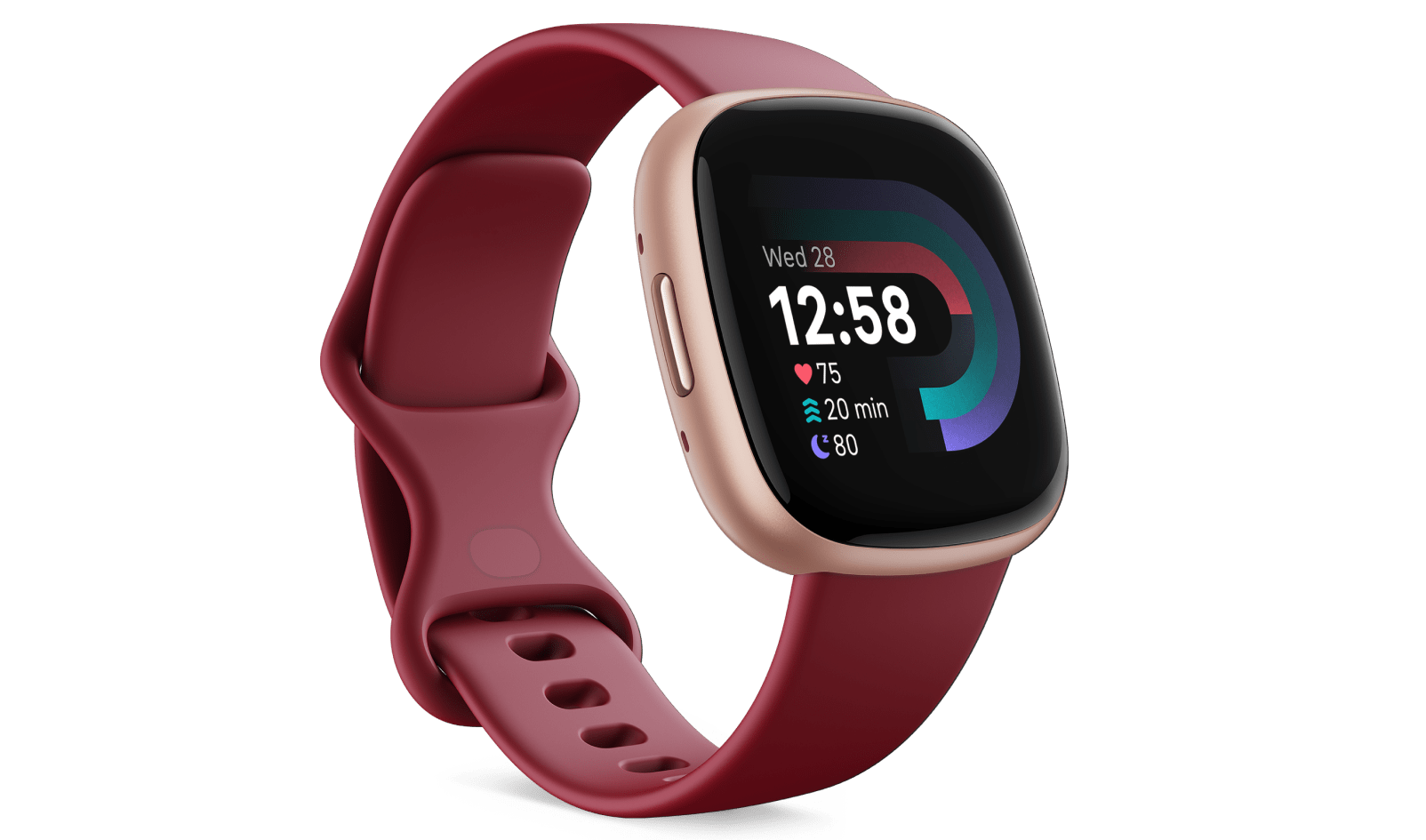
Key features of Versa 4: - 6+ days battery life on paper (in reality ~4-5 days with normal use, which is still far better than Apple’s 1 day). It’s not as long as Garmin or Amazfit, but plenty to get through almost a week. - Excellent sleep tracking: Fitbit is often considered the gold standard for consumer sleep analysis. It gives a detailed breakdown of light, deep, REM, plus a nightly Sleep Score. Users frequently mention how insightful and accurate it is – it can even log variation in oxygen levels (helpful for spotting issues like apnea). - Daily Readiness Score: If you subscribe to Fitbit Premium (comes free for 6 months), you get a readiness score each morning that tells you if you should rest or go hard, based on your recent activity, sleep, and HRV. It’s similar to Amazfit’s readiness and Garmin’s body battery, but Fitbit’s interpretation is user-friendly with suggestions. - Fitbit’s community & app: The app is extremely user-friendly and has a huge community. You can add friends, do challenges (like who gets the most steps), and share badges. If you’re motivated by that social element, Fitbit wins. A Reddit user said after reservations about the Versa, “reading these comments put my mind at ease” – indicating the supportive community around Fitbit. - Lightweight design: The Versa 4 is slim, about 40mm size, and very light (~37g). Many love that they “forget it’s on” even while sleeping. It has a square face akin to Apple Watch (but thinner). The display is good (not as high-res as Amazfit/Apple, but bright enough). - Built-in GPS: Unlike older Fitbits, the Versa 4 has standalone GPS, so you can track runs without your phone. However, note: some users reported occasional GPS drop-outs or slow lock times – it’s generally fine in open areas, but not as robust as Garmin’s. - Voice Assistant: It supports Amazon Alexa (no Google Assistant, ironically, despite Google owning Fitbit now). You can speak queries and see text responses (there’s no speaker). It’s handy for quick info or smart home control.
Why choose Versa 4? - If you’re primarily focused on health tracking and lifestyle, rather than athletic training. Fitbit excels in everyday wellness: step challenges, gentle nudges to move each hour, logging water/food, menstrual cycle tracking, etc., all in one app. - Simplest user experience: It’s arguably the easiest to use. No complex settings – it just works out of the box. This is great for less tech-savvy users or those who don’t want to fiddle. An Amazon review example (paraphrased): “Great battery life and no syncing issues. As long as you don’t compare it directly to an Apple Watch, it’s great”. That sentiment sums it: appreciate it for what it is, a simpler device, and it shines. - Strong integration with phones: On Android, Versa 4 can do quick text replies and even voice replies via Alexa for texts. It also now supports Google Wallet (recent update) for contactless pay, and soon (if not already by the time of writing) turn-by-turn directions from Google Maps on your wrist[3]. These updates address some earlier complaints that Versa 4 lacked those. - For iPhone users not wanting Apple Watch: Fitbit has long been a go-to for iPhone users who want a simpler, cheaper alternative. It plays well with iOS – data can sync to Apple Health via third-party apps if needed. You won’t reply to iMessages, but you’ll get all your notifications and top-notch health data.
However, it’s important to mention some common complaints about Versa 4 (so you know why it’s a bit controversial in tech circles): - Fitbit removed some features compared to Versa 3: music playback (no music storage or controlling Spotify), Wi-Fi syncing (now it syncs via phone Bluetooth only), and third-party apps (no more app gallery). This angered some long-time users. Essentially, Versa 4 is refocused purely on fitness, offloading smart functions to phone. - Some users report occasional GPS or sync issues, though others have zero problems after updates. It can depend on your phone model. Fitbit’s sync is usually solid on iPhone, but on Android certain phones may need troubleshooting (closing/reopening app, etc. – far better than years ago though). - Fitbit Premium subscription: while not mandatory, a lot of the advanced metrics (detailed sleep breakdown, readiness, long-term trends) are behind the Premium paywall after the trial. It’s about $10/month. If you’re not keen on ongoing costs, you still get plenty without it (core sleep stages, daily scores, etc., just less analysis). But to fully unlock its potential, Fitbit does encourage that subscription. Some people count that as a con, others happily pay for the extra guidance.
In spite of those, real users still find Versa 4 “perfect for what I need” – an average review snippet: “Great battery, tracks my runs and sleep, and the app motivates me. I don’t miss the fancy stuff.” Many appreciate that it’s a focused fitness watch, not a mini phone.
So, choose Fitbit Versa 4 if you want a friendly, health-oriented smartwatch that keeps you accountable and fits effortlessly into your life. It’s especially good for those who care about sleep quality, want to join friends in fitness challenges, or just prefer Fitbit’s style (lots of folks stick with Fitbit because all their history is there and they enjoy the platform). Also, if you find a sale, the Versa 4 can dip to ~$160, making it an even better bargain.
🔋 Best Battery Beast & Rugged Option: Amazfit T-Rex 2 (or T-Rex 3)
If you thought the GTR 4’s battery was great but want even more, or you need a smartwatch that can take a beating in the outdoors, Amazfit’s T-Rex series might be your match. Specifically, the Amazfit T-Rex 2 (often priced around $179) and the newer T-Rex 3 (~$199) are worth a look. These are built like tanks and have truly insane battery life – at the slight expense of some style and weight.
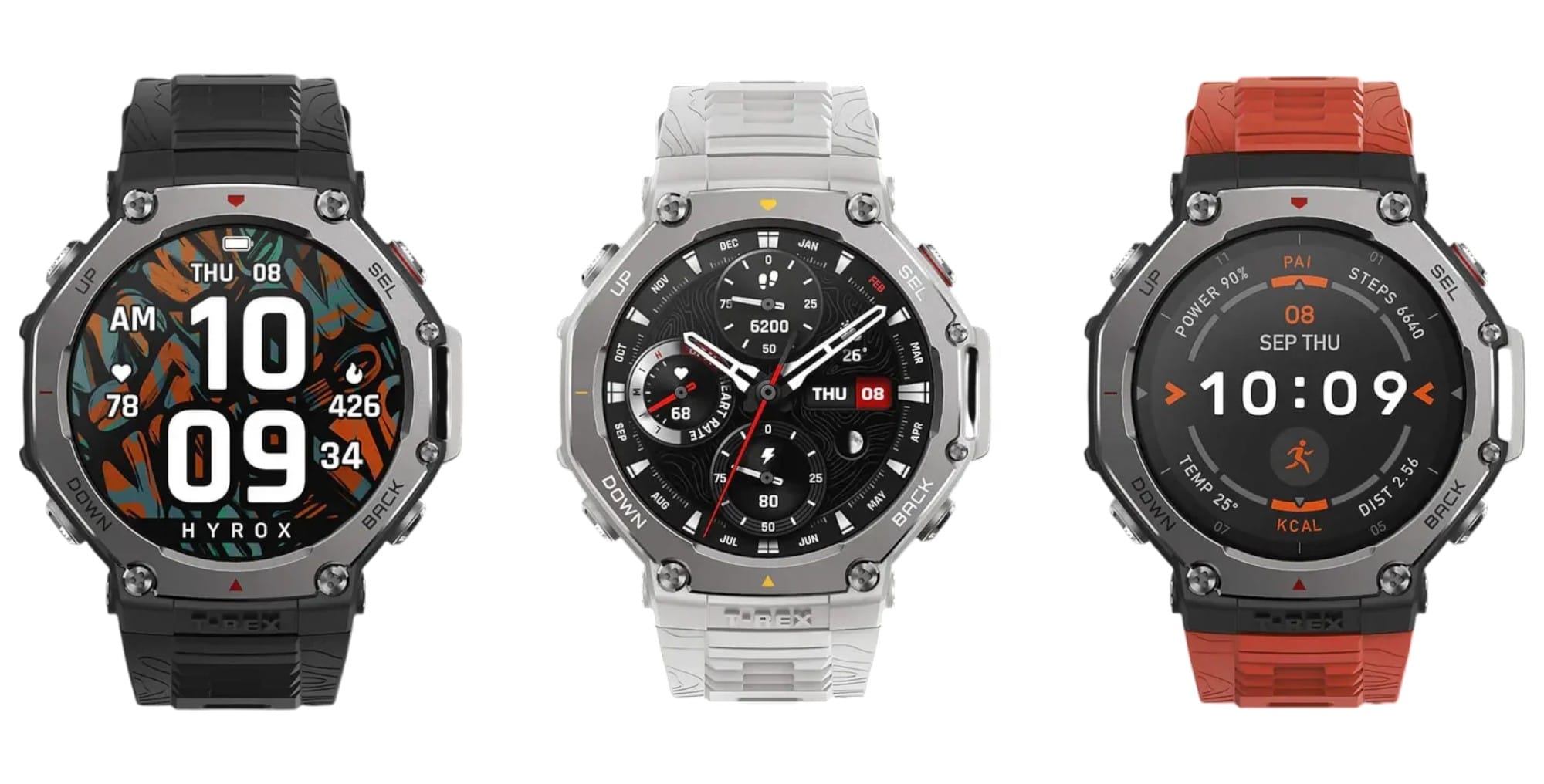
Why the T-Rex? - Ultra-Long Battery: The T-Rex 2 is rated for 24 days typical use (!) and 45 days in battery saver mode. Even with heavy GPS use, you’re looking at possibly 10-14 days. One user mentioned they had it on for over 3 weeks doing basic tracking. This is one of the longest-lasting full-featured watches on the market (as one Best Buy review highlighted – they used a T-Rex and were so spoiled by 28-day battery, they returned a Samsung watch that couldn’t compare). If you truly want to forget the charger for weeks, this is it. - Military-Grade Durability: The T-Rex 2/3 meet several MIL-STD-810G durability standards – heat, cold, shock, salt, humidity – you name it. They’re designed for hikers, soldiers, adventurers. The casing is chunky polymer with a bold bezel, so they survive drops and harsh conditions better than sleeker watches. Water resistance is 10 ATM on T-Rex 2 (good for high-speed water sports). - All key features onboard: Despite the rugged build, they have similar brains to the GTR 4: dual-band GPS, all the same health sensors, 150+ sports modes. They even add a few extras like a barometric altimeter and compass always visible, and on T-Rex 2 you can navigate routes or use Backtrack to retrace your path – great for hikers. - Large Screen: The T-Rex 2 has a 1.39” AMOLED (the T-Rex 3 bumps to 1.43”), so nice and big for outdoor viewing. It’s plenty bright for sunlight. And because it’s big, you can display more data at once (like 3-4 stats fields during an activity). - Physical Buttons: Unlike GTR 4, the T-Rex series has 4 physical buttons alongside the touch screen. This is great if you’re using it with gloves or underwater or just prefer tactile controls for laps, scrolling, etc.
Who should get T-Rex 2/3? - Outdoor adventurers and athletes: If you do trail running, mountain biking, hiking, etc., this watch is tailored for you. You can go on a week-long trek and track GPS every day without charging. The durability means you don’t have to baby it – mud, scrapes, knocks against rocks, it can handle that. (Think of it as Amazfit’s version of a Garmin Instinct or Casio G-Shock, but with a color AMOLED and smarter OS.) - Those wanting maximum battery above all: Perhaps you travel to remote areas often, or you simply loathe charging and want to push it to a month between charges. This is basically a semi-smartwatch with fitness focus that can achieve that. - People who like the G-Shock aesthetic: The T-Rex has a macho, rugged look. Some love it as a style – big knobby bezel, screws visible. It comes in camo and army green options. If you’re into that outdoorsy military look, it doubles as a fashion statement.
Downsides: - It’s bulkier and heavier (about 66g, almost double the GTR 4’s weight). On a small wrist, it’ll look huge. It’s fine on medium to large wrists and the straps are very secure. - No speaker or mic – so unlike GTR 4, no calls or Alexa voice responses. It’s more pure fitness tool. - Though it runs the same Zepp OS, performance can be a tad slower just because of the heavy UI elements (nothing major, but in reviews sometimes animations aren’t as slick – likely tuned for power saving). - Not the most office-friendly look. If you need to wear suits daily, a giant tactical watch might not fit under a cuff or match the vibe. But many still rock it regardless.
User feedback: People who own T-Rex absolutely rave about battery and toughness. One said “Amazfit continues to impress me. Battery life is amazing – if you’re an outdoorsman this is the watch for you”. Another mentioned how after trying a mainstream smartwatch, they returned to T-Rex for the sheer convenience. Many enjoy that they can just go “camping for a week without a charger and still track everything.” Athletes enjoy the reliable GPS, and the high-contrast screen for data in bright sun.
So, if you identify as a weekend warrior, outdoor explorer, or just someone who wants the longest-lasting smartwatch possible under $200, the T-Rex 2 (or 3, which has minor upgrades like new sensors and maybe slightly refined design) is your top pick. It might not be as “smart” in everyday features, but it will outlast and out-survive pretty much every other smartwatch out there in this class.
🏅 Best $100 Budget Pick: Amazfit Active 2 (Ultra-cheap Champ)
If you’re looking to spend closer to $100 than $200, the Amazfit Active 2 deserves a shout. We referenced it earlier in our comparisons – it’s frankly astonishing what this watch offers at roughly $99. In fact, TechRadar gave it a rare 5-star rating, calling it “a triumph for inexpensive wearables” and said it punches well above its weight in features and accuracy.
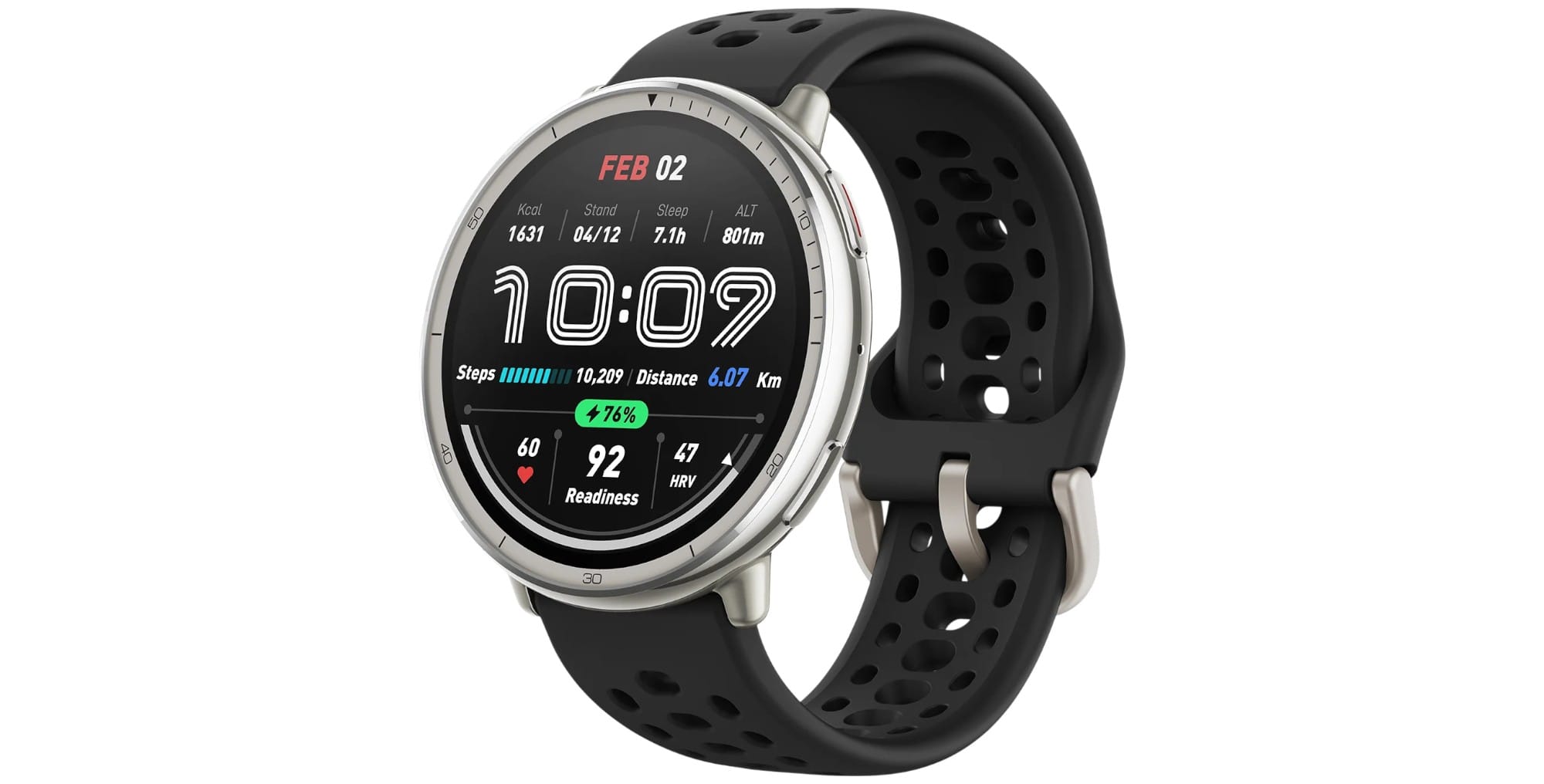
What makes the Amazfit Active 2 special for the price: - It covers all the core features: 24/7 heart rate, SpO₂, stress, sleep tracking, built-in GPS (yes, it has GPS), 5 ATM waterproof, and 100+ sport modes. This is basically equivalent to what a Fitbit Versa 4 offers in terms of sensors – at half the price. - 10-day battery life – exceptional at this price point. Real use might be 7-10 days, which still destroys similarly priced Fitbits (e.g., Fitbit Inspire or older Versa Lite). - Premium build touches: It has a stainless steel bezel and a 1.32” AMOLED display. That’s right, a $99 watch with an AMOLED and metal in the build – unheard of from any other brand. TechRadar remarked “I honestly can’t believe how premium the design feels for a $99 smartwatch”. - Comfortable and lightweight: It’s slim and light, making it great for small wrists or anyone who wants a barely-there feel. - Unique features: It includes an AI running coach and even a barbell rep counting mode (for strength training). Those are things normally found on more expensive devices. Now, they noted the strength mode was a bit clunky, but it’s still cool that it tries to do it. - There’s a mic and Alexa support as well. (No speaker, so Alexa responds via text). Many budget watches skip voice control; this one doesn’t.
Who should consider Active 2: - Those on a tight budget who still want a full-fledged smartwatch experience. For ~$100, you’re getting 90% of what a $200 watch offers. It outperforms anything from established brands at the same price (e.g., Garmin’s $150 watches don’t even have AMOLED or music or some of these features). - First-time smartwatch buyers not sure if they’ll like one – this is a low-risk way to test the waters. Yet you won’t be missing major things, so you can truly see if wearing a smartwatch daily is for you. - Gift buyers: If you’re gifting to say, a teen or someone not super techy, the Active 2 is awesome because you give them so much functionality without breaking the bank. - People prioritizing value: Quite frankly, this is arguably the best value smartwatch on the market. Reviewers said it “far outstrips its price tag” and even “would give the Apple Watch SE a run for its money despite costing less than half”. If reading that gives you a thrill (because you love getting a deal), you’ll likely be very satisfied with this purchase.
That said, it has a couple limitations by design: - No on-board music storage or speaker: Not shocking at $99. It can control your phone’s music though. - NFC only in Premium edition: There is a $129 “Active 2 Premium” that adds NFC and a leather strap + sapphire glass. But the base $99 one has no payments. - Zepp OS Lite: It runs a slightly stripped version of Zepp OS (fewer fancy animations, etc., to fit the slightly lower-end processor inside). But functionally it’s almost the same. - Availability: It’s a newer model (late 2023). Ensure it’s available in your region (it is on Amazon in many countries).
Real user reaction to Active 2: Given it’s newer, there’s less community feedback yet. However, initial responses are very positive. People can’t believe the price-to-features ratio. Some are buying it as a backup watch or a travel watch to not worry if it gets lost, since it’s so affordable but still competent.
To sum up, the Amazfit Active 2 is the “best bang for buck” pick. If your budget is firmly under $150 or you simply love maximizing value, it’s the one to beat. It’s proof that you can get a functional equivalent of a midrange smartwatch at a budget price if you look at brands like Amazfit. We wouldn’t recommend anything cheaper from lesser-known brands (those $50 no-name smartwatches) because they usually have big compromises. But Amazfit’s budget offering is legit. It’s even got the same Zepp app and ecosystem as the pricier models, so you’re not siloed anywhere.
Each of these alternatives shines in particular areas, so consider which traits matter most to you: - Garmin Venu Sq 2 – for the fitness data geeks and reliability nerds, with good battery. - Fitbit Versa 4 – for the holistic health, ease of use, and social motivation, with decent battery. - Amazfit T-Rex 2/3 – for the adventurers and battery extremists who need a rugged companion. - Amazfit Active 2 – for the budget-conscious who still want a rich feature set.
The good news? All of them undercut Apple Watch on price while outperforming it in battery life. So, you have plenty of strong options to choose from based on your personal priorities.
Weighing this against the real thing? Our full Apple Watch Series 11 review covers what you would actually be paying extra for, and our best Android smartwatch picks cover more options if you are not on iPhone.
Buyer’s Checklist: 10 Things to Consider Before You Purchase
Buying a smartwatch is an investment in both money and your daily lifestyle. Before clicking that “Buy” button, run through this quick checklist to ensure the watch you choose is the perfect fit for your needs:
1) Compatibility with Your Phone: Make sure the watch works with your smartphone’s OS. All our picks here support Android and iOS (except Apple Watch which is iOS-only). Double-check any device you consider – e.g., Samsung’s latest require Android, and older Wear OS need certain versions. Also, note what features work on each platform (e.g., quick replies often Android-only for non-Apple watches).
2) Your Priorities – Fitness vs. Smart Features: Be clear on what you want most. If you primarily want fitness tracking (steps, workouts, GPS), prioritize watches known for accuracy and health metrics (Garmin, Amazfit). If you want a mini smartphone on your wrist for apps and calls, lean towards watches with speakers, robust app stores (Apple, some Wear OS). Our guide leans toward fitness and battery, but identify your must-haves so you don’t regret it.
3) Battery Life Expectations: How often are you okay with charging? If you never want to charge more than once a week, rule out anything with <3 days battery (so likely avoid Apple/Samsung – stick to Garmin, Amazfit, Fitbit). Read real-world battery reports; manufacturer claims can be optimistic. For instance, Apple says 18h (often true), Garmin says 11 days (users get ~7-8 days), etc. Match a watch’s endurance to your lifestyle.
4) Health Features & Accuracy: Consider which health features you need:
Heart rate and GPS – standard on all our picks. If you’re a serious runner, dual-band GPS (Amazfit GTR 4, T-Rex) or Garmin’s accuracy might matter more.
Advanced sensors like ECG or skin temperature – only on pricier models (Apple, Fitbit Sense). If you need those, be ready to spend a bit more or accept a trade-off.
Sleep tracking – if important, look at Fitbit (best analysis) or Amazfit/Garmin (solid as well). User reviews can indicate how accurate sleep tracking is.
If you have specific goals (training for a marathon, monitoring AFib, etc.), choose a watch known for that domain.
5) App Ecosystem & Third-Party Support: Ask yourself: Do I need apps on my watch (Spotify, Uber, maps)? If yes, Apple Watch or Wear OS might be necessary. The watches in this article have limited third-party app support. If you’re fine with built-in capabilities and using your phone for complex tasks, then our picks will serve you well. But if you envision downloading lots of watch apps, consider that carefully.
6) Phone-Free Usage Needs: Do you want to use the watch away from your phone often?
For music: Do you need offline music playback (for runs without phone)? If yes, look at Garmin Venu Sq 2 Music edition or older Fitbit with music, or carry a phone. GTR 4 can load MP3s but it’s clunky.
For calls/texts: None of these have cellular, so you’ll need your phone nearby for connectivity. If you want a true standalone device, that’s a different class (and budget).
For payments: If leaving phone behind but still paying by watch is a goal, ensure the watch has NFC payments and supports your card (Fitbit/Google Wallet, Garmin Pay have decent coverage). Otherwise, plan to bring a card or phone.
7) Size & Comfort: Look at dimensions and weight. A watch won’t do any good if you don’t enjoy wearing it. For small wrists, something around 40-44mm case and lighter weight (<50g) tends to feel better (Versa 4, Venu Sq 2 are good here, GTR 4 borderline but still fine for many). Larger watches (T-Rex, some 46mm ones) might feel bulky to some but great to others. Also consider band comfort – silicone is sporty, nylon can be comfy for sleep, leather/metal for style. Check if the bands are standard or proprietary for future replacements (Amazfit/Garmin use standard pins, Fitbit uses proprietary quick-release).
8) Durability & Warranty: Think about how you’ll use it. If you work a rough job or do extreme sports, a rugged model or at least a watch with Gorilla Glass/DLC coating might be wise. Some models (Garmin, Amazfit) have MIL-STD ratings and sapphire options. Also consider the warranty and support: Garmin and Fitbit have strong support networks, Amazfit is improving (usually 1-year warranty, you might deal via Amazon or their service). It’s worth reading experiences: e.g., Fitbit has known to occasionally replace devices out-of-warranty as goodwill, etc., whereas with lesser-known brands you may have to jump through more hoops.
9) Software & Ecosystem Fit: Are you okay installing and using another app on your phone? You’ll need to use Garmin Connect, Zepp (for Amazfit), or Fitbit app regularly. See if they integrate with other services you use (e.g., Apple Health, Google Fit, MyFitnessPal, Strava). For instance, Garmin and Amazfit sync to Strava[2], Fitbit can export to MyFitnessPal for calories, etc. If you have a history in one ecosystem (years of Fitbit data or Garmin data), you might weigh sticking with it versus starting fresh in a new app.
10) Price & Value: Finally, set a budget and compare what you get for the price. Under $200, you have options from ~$100 to $200. Sometimes spending a tad more gets a lot more longevity or features – e.g., $180 GTR 4 vs $130 Active 2. Decide if those extras are worth it. Also consider sales: if not urgent, you might snag deals during Black Friday or holiday sales on these (Fitbit and Garmin frequently go on sale). However, popular models can sell out too. Factor in any accessories cost (perhaps buying extra bands, screen protectors, etc., though not necessary, some prefer them).
Bonus Tip: Read or watch a couple of reviews (we’ve cited many in this article) for any model you lean towards. The citations we provided like “battery life holds up to claims” or “strength workout feature is clunky” give you insight. Use those to gauge if any deal-breaker issues exist.
By ticking off this checklist, you’ll ensure you choose a smartwatch that fits not just your wrist, but also your lifestyle and expectations. The goal is to have a device that motivates you and simplifies your life – and not end up in a drawer due to unmet needs or annoyances you didn’t foresee.
Final Recommendation
Choosing the right smartwatch comes down to finding the best fit for your lifestyle, and the great news is you don’t have to spend a fortune to get a fantastic experience. After deep diving into specs, real-user feedback, and our own hands-on impressions, here’s the bottom line:
The Amazfit GTR 4 stands out as the best all-around smartwatch under $200 for most people. It delivers what matters – long battery life, reliable health tracking, and broad phone compatibility – in a polished package that genuinely feels premium. If you want a watch that you can trust on a 5-day work trip (without a charger), that motivates you to close your rings or hit the gym, and that doesn’t lock you into one phone brand, the GTR 4 is hard to beat. Users who’ve switched from Apple Watch often don’t look back due to the freedom it offers in battery and device choice. It proves you can have a top-tier smartwatch experience at a mid-tier price.
That said, “best” can vary slightly by individual: - If you’re deeply entrenched in the iPhone world and want as much integration as possible without the Apple price, consider the Fitbit Versa 4. It plays nicely with iOS, is extremely user-friendly, and nails the fundamentals of fitness and notifications. It’s not as feature-rich as the GTR 4, but it’s a comfortable, no-fuss companion – especially great if you love tracking sleep and being part of Fitbit’s social community. - If you’re a fitness enthusiast or data-driven athlete, the Garmin Venu Sq 2 is a worthy alternative. You’ll gain Garmin’s trusted accuracy and training tools, and still get multi-day battery life. It’s the watch that feels most like a “coach on your wrist” with insights and proven reliability. - For the ultimate battery and ruggedness, the Amazfit T-Rex 2/3 is almost a category of its own. It’s overkill for some, but for adventurers or those who want a watch they charge once a month, it’s a dream come true – and it’s very much under $200. - And if you’re on a tight budget, don’t hesitate to grab the Amazfit Active 2. At ~$99, it demolishes any expectations of a “budget” watch, often matching or exceeding what devices at double the price offer. It’s perhaps the clearest proof that you can get a lot for a little.
In closing, the sub-$200 smartwatch market has matured immensely. You are no longer forced to choose between a premium Apple Watch and a basic tracker – there’s a sweet middle ground where these devices reside, offering 90% of the functionality for sometimes 50% of the cost. They outshine the Apple Watch in areas many people care about: not charging daily, working with whatever phone you have, and focusing on health benefits without breaking the bank.
Our advice: Identify what you value most (be it battery, fitness features, style, or brand ecosystem) and choose the watch that aligns with that. All the models we’ve discussed are tried-and-tested, with real users vouching for their quality and value.
Whichever you pick, you’ll be joining the ranks of savvy smartwatch owners who realized they could get an amazing wearable – one that even outperforms the mighty Apple Watch in key ways – without overspending. Here’s to a healthier, more connected lifestyle on your terms, and on your budget!
Happy tracking! 🏆
Frequently Asked Questions
What's the best smartwatch under $200 overall?
The Amazfit GTR 4 is the top pick. It works with both Android and iPhone, lasts 10–14 days per charge, and includes dual-band GPS, an AMOLED display and an SpO₂ sensor.
How does the Amazfit GTR 4's battery life compare with the Apple Watch?
The GTR 4 lasts 10–14 days per charge in real use, compared with around 18 hours for the Apple Watch.
Is the Apple Watch SE a good option under $200?
Not really. The Apple Watch SE typically retails around $249 and rarely drops below $200, so it isn't the best value at this price point.
What's the best alternative if fitness tracking accuracy matters most?
The Garmin Venu Sq 2 is the runner-up pick, often priced around $199, with up to 11 days of battery life and the GPS and heart-rate accuracy Garmin is known for.
Do these picks work with iPhone as well as Android?
Yes — the Amazfit GTR 4 is compatible with both Android and iPhone.
By ChoiceWise