Apple Watch Series 11: Honest Review – Does It Really Revolutionize Fitness Tracking?
Last updated: 16 August 2026.
Introduction
Apple has pitched the Apple Watch Series 11 as a major leap forward for health and fitness tracking, touting “groundbreaking health insights” and calling it the ultimate health and fitness companion[1]. With features like blood pressure notifications and a new sleep score, plus a first-ever boost to 24-hour battery life, the Series 11 arrives with big promises. For fitness enthusiasts and health-conscious users in their 30s and 40s, the question is whether these upgrades truly revolutionize fitness tracking or simply refine what Apple’s wearables already do well. In this honest review, we cut through the marketing hype and examine the Series 11’s real-world performance in fitness and health monitoring. We’ll compare Apple’s claims versus reality, dive into the hardware and sensors relevant to workouts, and see how this watch stacks up against competitors like Garmin, Samsung, and Fitbit.
The Series 11 continues Apple’s pattern of iterative annual updates – a thinner design, a brighter always-on display, and a more efficient S10 chip are part of the package. But the headline features center on health: it introduces hypertension notifications (now available via watchOS 26 on Series 9 and later) and a new single-number Sleep Score each morning. Apple clearly hopes these position the Series 11 as a “groundbreaking” fitness tracker and not just a minor refresh. Our review approach is practical and slightly skeptical – is the Series 11 truly a game-changer for tracking your runs, workouts, and wellness, or are we looking at incremental improvements marketed as revolutions?
We’ll also consider who will benefit most from this device. The Series 11 isn’t cheap (starting around £369) and faces stiff competition. Hardcore athletes might gravitate to Garmin or Apple’s own Ultra model for rugged features, while casual users could save money with the SE. The tone here is candid: we won’t shy away from pointing out limitations like battery life or overhyped features. By the end, you’ll have a clear sense of whether the Apple Watch Series 11 truly transforms fitness tracking – or if it’s simply Apple’s best iteration yet for those who prioritize health monitoring.
What Apple Claims Is “Revolutionary” About Fitness (Marketing vs. Reality)
Reality check: From its late 2025 launch, Apple’s marketing made bold claims about the Series 11’s fitness prowess, calling it the “ultimate health and fitness companion” with “groundbreaking health insights.” The two headline innovations are hypertension notifications and a new single-number Sleep Score. Apple positions the hypertension alert as a “pioneering feature” unique among mainstream wearables, and pairs it with longer battery life and watchOS 26’s Workout Buddy coaching to suggest the Series 11 revolutionizes fitness and wellness tracking.
Apple touts Workout Buddy’s “personalized audible motivation in real time” as a smart innovation—an AI voice coach offering mid-run encouragement like personal best cheers. Early reviews call it a mixed bag: a cheerleader for solo workouts that can motivate one moment and annoy the next. The Verge described it as “fine but not spectacular”—helpful audio cues but no deep training insights. Testers noted occasional errors, like misstating elapsed time. Apple pitches it as coaching revolution, but it’s really an early, helpful-but-imperfect iteration.
Finally, Apple’s claim that Series 11 is the “ultimate” health and fitness device deserves scrutiny. It packs a huge array of features—ECG, blood oxygen, temperature-based cycle tracking, fall/crash detection, plus new sleep apnea and hypertension alerts—unmatched by many single devices. But most existed in prior models or arrived via software updates (watchOS 26 brought Sleep Score to Series 6 and later, while hypertension alerts came to Series 9 and later). The most exciting updates—gesture controls, revamped widgets, Sleep Score—are platform features, not Series 11 exclusives. The revolutionary feel fades when a Series 10 on the same software can do almost everything the 11 can.
Bottom line: Apple’s marketing suggests a paradigm shift in fitness tracking, but the truth is more nuanced. The Series 11 brings meaningful improvements – a first-of-its-kind Apple approach to blood pressure risk, better battery for all-day/all-night use, and convenient coaching and interface tweaks. These are evolutions that refine the Apple Watch’s role as a health tool, rather than outright revolutions. It’s Apple’s most capable fitness watch yet, but as we’ll see, it largely builds upon an already strong foundation instead of inventing an entirely new one. Next, let’s look at the hardware and sensors under the hood enabling these features.
Hardware & Sensor Changes Relevant to Fitness Only
The Series 11’s hardware changes are subtle but meaningful for fitness users. It comes in 42mm and 46mm sizes, stays slim at 9.7mm thick, and looks nearly identical to Series 10. Build options include lightweight aluminum or titanium. Aluminum models now feature tougher Ion-X glass that’s 2× more scratch-resistant than Series 10’s—great for gym-goers or trail users who bang their watch around. Titanium keeps its virtually scratch-proof sapphire crystal[16].
Under the hood, the new S10 chip (64-bit dual-core processor + 4-core Neural Engine) brings snappier performance and better battery efficiency. It enables on-device Siri for faster workout voice commands (no internet needed) and likely powers Workout Buddy and advanced health algorithms. Core sensors remain unchanged from recent models: third-gen optical heart rate, electrical ECG, blood oxygen, and wrist temperature. Apple emphasizes the “two heart sensors” (optical + electrical) working together, with ongoing algorithm tweaks improving accuracy and enabling features like hypertension detection via pulse wave patterns. No dramatic new hardware here—just refined existing tech.
One clear hardware addition: 5G connectivity on cellular models (a step up from previous LTE support). It doesn’t affect core tracking metrics but enhances phoneless runs with faster music/podcast downloads, more reliable Apple Music or Fitness+ streaming, and stronger signal for maps or SOS in weak areas. Redesigned antenna reduces dead zones. These are solid quality-of-life upgrades for outdoor workouts.
Fitness users will appreciate the GPS refinements. Series 11 uses standard multi-constellation GPS (GPS, GLONASS, Galileo, QZSS, Beidou) but lacks the dual-frequency (multiband) GPS found on Ultra models, which theoretically helps in tough environments like urban canyons or deep trails. Real-world testing shows minimal difference: experts, including DC Rainmaker, report Series 11 pins routes accurately even in tall buildings and cliff trails, performing on par with Ultra in most scenarios thanks to Apple’s tuned antenna and algorithms. On paper it’s a step down, but in practice, run maps and distance tracking are solid for the vast majority of users.
Another key change is battery capacity—improved over Series 10's 18-hour rating, enabling Apple's first official 24-hour endurance claim for a flagship Series model. Combined with S10 efficiency, this supports all-day tracking plus overnight sleep monitoring without dying mid-way—a non-trivial upgrade for 24/7 fitness use. The Ion-X glass on aluminum models now has a molecular ceramic coating for better scratch resistance, helping trail runners and CrossFitters avoid scuffs. It retains 50m water resistance, IP6X dust-proofing (safe for swims, showers, dusty trails), a depth gauge (to 6m for snorkeling/pool diving), and water temperature sensor—useful for swimmers and surfers[15].
In summary, the Series 11’s hardware upgrades are mostly refinements aimed at better fitness tracking convenience rather than brand-new tech. You’re getting a watch that’s slightly tougher, slightly larger in display, and packs a more efficient brain and battery. Crucially, all the essential health sensors (heart rate, ECG, SpO₂, temperature, GPS, altimeter, etc.) are intact and improved via software. There’s no flashy new sensor like glucose monitoring or a built-in blood pressure cuff – rumors of those didn’t materialize for Series 11. Instead, Apple doubled down on optimizing what was already in recent models: more battery for 24/7 use, stronger connectivity (5G) when you leave the phone behind, and small design tweaks to keep the watch comfortable around the clock (it’s indeed lightweight and slim enough to wear to bed without too much annoyance). These hardware choices set the stage for Apple to push fitness features further via software, which we’ll explore in subsequent sections.
Fitness Tracking Accuracy & Real‑World Performance
Spec sheets and features aside, how does the Apple Watch Series 11 actually perform when you’re sweating through a workout or going about your daily activity? Accuracy is paramount for any fitness tracker, and here Apple mostly maintains its strong reputation, with a few caveats for niche cases.
Heart rate accuracy: The Series 11 uses Apple’s proven optical wrist sensor. In steady-state cardio (moderate runs, cycling, brisk walking), readings are very good—typically within a few bpm of a chest strap (gold standard). Apple’s refined PPG algorithms and published validation studies make it trustworthy for zone training and rest alerts. It handles intervals and HIIT decently, with faster recovery between bursts than older models. Limitations remain: intense arm movement (boxing, CrossFit) or loose fit can cause lag/spikes, so precision-focused athletes may still pair a Bluetooth chest strap. Overall, Series 11’s HR accuracy ranks among the best in smartwatches—often comparable or superior to Samsung’s Galaxy Watch per user reports[14].
GPS & distance tracking: Testing shows excellent performance on runs, rides, and hikes—accurate routes, stable distances, and reliable pace without erratic jumps. Despite lacking multiband GPS (found on Ultra), real-world tests (including DC Rainmaker’s) reveal virtually no meaningful difference vs. Ultra 3 in most scenarios, thanks to Apple’s optimized antenna and algorithms. Unless you train in extreme GPS-challenged spots (dense urban canyons or deep ravines), mapping is solid. Tom’s Guide found Series 11 more precise than Galaxy Watch in a controlled 5,000-step test. It uses iPhone calibration, Wi-Fi cues for faster lock, and automatic track detection for accurate lap snapping on standard 400m tracks—great for interval sessions.
Daily activity and other metrics: Daily activity metrics (steps, calories, floors climbed) remain reliable. Step counting filters false motions well, and the always-on altimeter logs stairs/hills in real time. Calorie estimates (based on HR + motion) are well-calibrated and provide a consistent trend baseline—though no wearable is perfect due to individual metabolism. The real limiter is battery: GPS recording lasts ~8 hours in long workouts (e.g., ultra runs or hikes), after which it may need low-power mode or die—far short of Garmin’s 20–40-hour endurance. Accuracy is excellent within its recording window, but it’s not suited for multi-day events without recharging.
Real-world usage shines in frictionless tracking. The 2000-nit always-on display is bright and readable in direct sun. It’s responsive via wrist raise, crown, or taps—though no Action Button (unlike Ultra) means screen/crown for lap splits or mode changes (fine for most, less convenient than Garmin’s physical buttons in intense sessions). Double-tap gesture lets you start/end workouts hands-free (ideal when sweaty/gloved), and wrist-flick dismisses notifications quickly. These small UI wins reduce distraction and make the watch more usable mid-training.
Sleep tracking accuracy benefits indirectly from the improved battery—more likely to last through the night for consistent wear (detailed in next section).
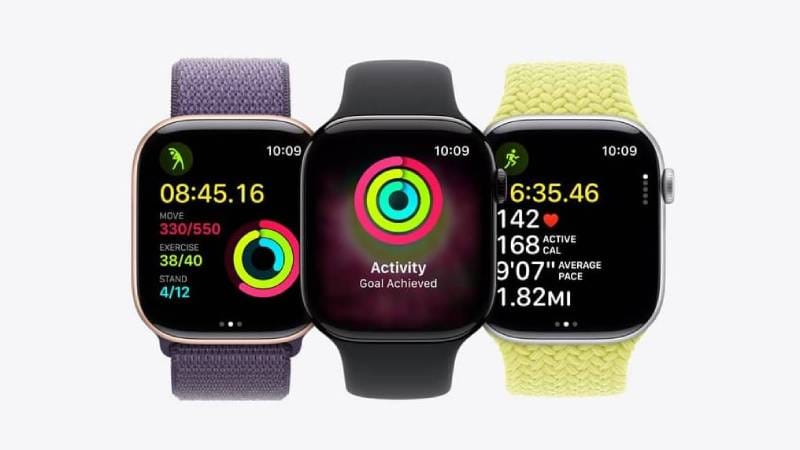
Overall, Series 11 delivers reliable day-to-day fitness tracking: accurate run logging, solid heart rate for workouts/recovery, polished step/floor monitoring, and the motivating Activity Rings. Apple didn’t reinvent sensors this year—the existing setup was already strong. Instead, they focused on usability (gestures, voice feedback) and reliability (better battery for 24/7 wear). Accuracy isn’t revolutionary (on par with Series 9/10), but it’s among the most dependable and user-friendly experiences in 2026—if your activities fit within the battery envelope.
Health Metrics: What’s New, What’s Improved, What’s Overhyped
Apple has steadily expanded the health metrics tracked by the Watch, and Series 11 pushes further on that front with a mix of genuinely new metrics and iterative improvements. Let’s break down the key health-related features and evaluate which are truly useful versus which might be more hype than substance:
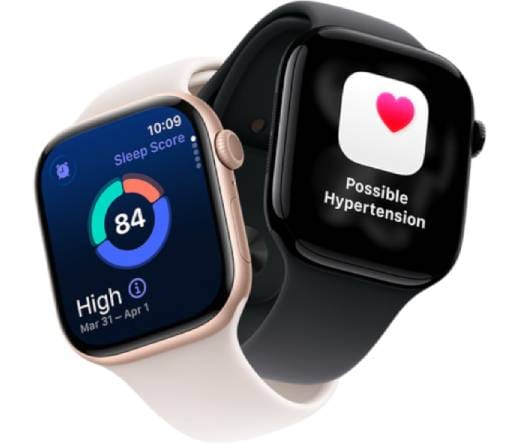
- Hypertension Notifications (High Blood Pressure Alerts): The flagship new feature. The watch analyzes heart rate data over weeks to detect patterns suggesting chronic hypertension, then displays a “Possible Hypertension” alert urging a doctor visit. No on-demand BP reading (no cuff or new sensor)—it’s an algorithm trained on 100,000+ participants, FDA-cleared, spotting subtle pulse wave changes. Potentially life-saving for early detection (Apple estimates detecting 1M undiagnosed cases in year one). It’s cautious: needs ~14 days of data in 30 days to trigger, runs in background, and many fit users won’t see it (a good sign). Not daily-use, but a valuable passive safety net. It supplements—not replaces—traditional cuffs; known BP patients still need manual checks. Available on Series 9 and later (including Series 11) via watchOS 26, so not Series 11-exclusive.
- Sleep Score (and Sleep Apnea Notifications): Apple joins the sleep score trend with watchOS 26. After ~7 nights for baseline, you get a 0–100 Sleep Score each morning based on duration (~7-8 hrs max credit), consistency (regular bed/wake times), and interruptions. It prioritizes controllable behaviors over mysterious biometrics (e.g., low score from 4 hours sleep is obvious), making it actionable for habit improvement—reviewers praise this focus. Not revolutionary (Fitbit/Garmin/Oura had similar for years), but well-integrated into Apple Health. It also flags possible sleep apnea via breathing patterns (quiet addition, for doctor follow-up—not diagnosis; available on Series 9 and later, including Series 11).
Caveat: Benefits require consistent bedtime wear. Some find the 42–46mm size/band a bit uncomfortable for sleep (subjective—many adapt). Battery supports overnight tracking reliably (15-min charge = ~8 hrs), so no more skipping nights. Solid, practical feature—not overhyped.
- Vitals App & Health Trends: New in watchOS 26, the Vitals app aggregates overnight metrics (resting HR, respiratory rate, wrist temperature deviations) into one morning dashboard for a quick “big picture.” These existed before (HR/respiratory since earlier models, temp since Series 8), but now they’re presented conveniently on-watch—no need to dig in iPhone Health. Deviations (e.g., higher-than-normal resting HR) can hint at poor recovery or illness, encouraging rest. No explicit readiness score (unlike rivals), and minimal interpretation guidance—just raw numbers for you to understand. Still, a helpful step toward contextual health insights.
- Menstrual & Cycle Tracking Improvements: Continues Series 8’s temperature-based ovulation estimates and retrospective dates—improved accuracy with nightly wear. Not new to Series 11, but Apple emphasizes women’s health. Unique among mainstream watches (Garmin tracks cycles but lacks temp-based ovulation). Data stays encrypted/on-device. Valuable for many users; big gain if upgrading from pre-Series 8 models.
- Overhyped or Missing Metrics: Apple lacks native recovery time estimates, single “training readiness”/“body battery” scores (Garmin/WHOOP style), or granular sports metrics like lactate threshold. New features (Sleep Score, Vitals) inch toward readiness but stop short of prescriptive advice—possibly deliberate to avoid oversimplification and keep ring-closing motivation. Training Load (from watchOS 11, carried forward) gives you a 7-day vs. 28-day workout strain comparison, which helps spot overtraining trends, but it’s still not a full readiness score. VO₂ max/Cardio Fitness remains unchanged (general trends, no deep updates). Apple prioritizes broad health over niche sports science.
In summary, New metrics (hypertension, Sleep Score) are legitimately useful—addressing cardiovascular screening and recovery with real research backing (FDA-cleared, large studies). Not gimmicks, but marketing can overhype “revolutionary” claims. It’s advanced evolution: catch-up on sleep scoring, leap ahead on integrated alerts. Requires consistent wear/data collection. For average users, offers peace of mind and early warnings (Woman & Home: “very reassuring” for sleep/BP concerns). Not medical replacement—supplement for doctor discussions.
Workout Tracking & Sports Performance
Apple Watch Series 11 continues Apple’s expansion from a general fitness tracker into a more capable sports watch. With each generation, Apple has added features traditionally found on dedicated running or multisport watches. So what does Series 11 bring to the table for tracking actual workouts and improving your sports performance?
The Workout app supports an enormous range—from running (indoor/outdoor), cycling, swimming (pool/open water), yoga, HIIT, hiking, strength training, Pilates, dance, and more. You’d need a truly niche activity to not find it covered. Series 11 refreshes the interface slightly: dedicated sport pages (no tiny tiles) with smooth scrolling animations make selecting workouts faster and less error-prone—handy when jumping on a treadmill or starting circuits.
Workouts offer rich, customizable metrics—surprising from Apple just a few years back. Runners get stride length, ground contact time, vertical oscillation, and running power (via third-party sensors/footpods), though power isn’t native. Built-in focus is on heart rate zones and pacing. You can fully customize Workout Views per activity (choose pace, distance, HR, splits, etc.)—essential for serious training (e.g., lap pace/cadence for marathoners, HR/intervals for HIIT). Apple now gives Garmin-like flexibility instead of rigid screens.
Heart Rate Zones (introduced prior, refined here) auto-calculate zones (age-based or personalized max/resting HR) and display your current zone live—excellent for structured training like zone 2 base runs or zone 4 intervals. Not revolutionary, but presented clearly and reliably.
Runners get Race Route (compete against past performances on the same route with ahead/behind alerts) and Pacer (set target pace with real-time guidance to speed up/slow down). These mirror Garmin’s Virtual Partner/PacePro, making Series 11 viable for serious run training up to marathon distance (battery ~8 hrs GPS is the main limit for slower races). Automatic track detection snaps GPS to 400m lanes for accurate lap data—no more erratic squiggles.
Cyclists benefit from Bluetooth sensor pairing (power meters, cadence, speed) with live power/cadence display. FTP estimates and Power Zones (introduced in earlier watchOS versions) support power-based training. Serious cyclists or triathletes can realistically use Series 11 as a bike computer (wrist or handlebar mount). Lacks deep navigation of dedicated units, but covers metrics solidly. Live Activities mirror data to mounted iPhone; UWB Precision Find helps locate tagged bikes or phones.
Swimming: 50m waterproof with pool and open-water GPS tracking. Auto-detects stroke type, counts laps, and provides SWOLF efficiency score. Satisfies recreational/club swimmers with accurate distance/lap logging (even recognizes kickboard non-counting). Water temperature sensor adds outdoor utility for safety/curiosity. Serious stroke analysts may prefer dedicated gear, but basics are solid.
Gym/HIIT modes (Functional Strength, High-Intensity Interval Training) track HR and calories accurately—no native rep counting (third-party apps can help). New “Music: Picked for You” auto-generates intensity-matched Apple Music playlists (e.g., high-tempo for HIIT). Fun integration of Apple services—hit-or-miss for some, but great for discovery if you don’t have set playlists.
Multisport & Triathlon: Supports auto-switching between swim/bike/run (introduced earlier, carried forward). Handles sprint/Olympic tris easily; Half Ironman possible if fast (~5-6 hrs total). Full Ironman unlikely without disabling features or partial recording—Ultra better for long events. Feature-wise, Series 11 keeps up impressively in tri tracking.
Where it falls short for pros: For serious/competitive athletes, Series 11 is close but not fully there. Reviewers note it lacks granular analysis/recovery guidance of Polar/Garmin/Coros. Touchscreen/crown operation can be fiddly in rain/gloves (no extra Action Button like Ultra). Ecosystem is simpler—no native periodized plans or deep charts (Fitness+ offers individual workouts only). Gaps are narrowing, but dedicated sports watches still lead for advanced users.
For most users—those staying active, improving gradually, or doing occasional races—Series 11 delivers fully: accurate tracking, workout versatility, phone integration (instant Strava logging, ring-closing motivation, badges), haptic mile alerts, and split announcements. It’s legitimately a training tool now, not just a step counter. Best for workouts under ~8 hours and those balancing fitness with daily smart features. It uniquely fits busy lives (morning run + meetings). Ultrarunners or extreme adventurers may hit limits and prefer Ultra/Garmin. Apple targets a broad audience and succeeds in giving beginners to serious hobbyists a capable, enjoyable device.
Recovery, Sleep, and Readiness Features
Tracking workouts is only half the story in fitness; the other half is recovery – how your body rests, adapts, and gets ready for the next effort. Devices like WHOOP and Oura have made their name focusing on readiness and recovery scores. So where does the Apple Watch Series 11 stand on this aspect?
Apple remains light on explicit recovery guidance—no single morning “readiness” score telling you to push or rest (unlike WHOOP/Oura/Garmin). But watchOS 26 + better battery provide building blocks for self-assessment.
- Sleep Tracking & Sleep Score: Daily 0–100 score emphasizes controllable factors (duration/consistency), encouraging better habits critical for recovery. Poor score signals possible incomplete recovery; users can infer rest needs. Still shows stages (REM, Core, Deep) and duration for detail.
- Heart Rate Variability (HRV) and Resting Heart Rate: Classic recovery indicators. HRV (SDNN) is recorded overnight (via Breathe/ECG sessions) and viewable in iPhone Health app trends—higher = better recovery, lower may signal fatigue/stress. Not surfaced on-watch or interpreted (missed opportunity). Resting HR is easier: daily average in Vitals app. Sudden elevation (e.g., 55 → 65 bpm) often means stress, poor recovery, or illness—users can interpret as a cue to ease training.
- Recovery Heart Rate (Heart Rate Recovery): Post-workout, shows HR drop in first 1–2 minutes (higher drop = better cardio fitness/less fatigue). Tucked in workout summary (scroll down). Track trends: slower recovery on exhausted days signals overtraining. Data exists; no explicit warning.
- No Formal “Training Readiness” Score: No Formal Training Readiness Score: Garmin, Fitbit, and Oura provide a single combined readiness number (sleep + HRV + fatigue). Apple has the data but avoids prescriptive scoring—likely to not discourage daily ring-closing activity. Users must interpret manually or use third-party apps (e.g., Athletic, Training Today) for a readiness gauge. Natively, Series 11 stops short.
- Mindfulness and Stress: Mindfulness app logs “State of Mind” (manual entry) and offers breathing/reflection exercises. Indirectly aids recovery by addressing chronic stress. No real-time stress measurement (unlike some rivals via HRV), but provides qualitative daily logging.
- Integration with Fitness+ and Rest Days: Fitness+ Integration & Rest Days: No direct rest-day prescriptions, but Fitness+ offers yoga/meditation for active recovery, plus guided cooldowns. Longer battery supports post-workout sessions + overnight tracking. Ecosystem promotes holistic wellness (meditation, gentle walks) as recovery tools.
Piecing together readiness: Check Sleep Score, Vitals (resting HR/HRV trends), subjective feel, and upcoming workouts. Training Load (next section) flags if 7-day load is notably higher/lower than 4-week average—indirect overtraining/detraining signal. Percentages only (no raw numbers), but useful for casual users to spot intensity spikes and prioritize recovery.
Sleep tracking benefits hugely from reliable 24-hour battery rating (including sleep tracking in Apple's test)—far less chance of missing nights due to low charge (common issue on older models). Fast charging (15 min = ~8 hrs) supports consistent wear. Series 11 feels truly built for 24/7 monitoring, foundational for recovery insights.
Overhyped vs. reality: Apple underplays recovery in marketing (focuses on alerts/activity). Community asks for readiness score; Series 11 gives data, not interpretation. Cautious philosophy avoids misguidance and prioritizes consistent movement (ring-closing) over frequent rest days. Nudge to move even after poor sleep—helpful or counterproductive depending on user.
In sum, the Series 11 significantly improves Apple’s ability to track your recovery factors (sleep, HR, HRV), but it leaves the “readiness” conclusion up to you. You have all the numbers: if you wake up with a Sleep Score of 50 (bad), a resting heart rate 10 bpm above normal, and you just did three days of hard workouts, you can infer you’re not in peak shape today. The watch won’t flash a big “TAKE A REST DAY” alert, but the savvy user can make that call. For those who want a simpler answer, third-party apps or simply listening to your body remain the way. The positive here is that Series 11 makes it much more feasible to gather complete data on sleep and daily vitals, which is the foundation of understanding recovery. It’s a tool – perhaps not a coach – but a tool that, used well, can absolutely help you balance work and rest better.
AI, Coaching, and Software Intelligence (Fitness-Related Only)
With Series 11 and watchOS 26, Apple introduced some AI-driven elements to the Watch experience, aiming to make it not just a passive tracker but an active fitness coach (albeit a gentle one). Let’s look at how “smart” the Series 11 is in helping you get fitter:
- Workout Buddy (Audio Coach): This is the marquee AI coaching feature. Apple describes it as “personalized audible motivation in real time”. Essentially, Workout Buddy is a voice assistant that pipes up during your workouts to provide encouragement, milestones, and possibly suggestions. For example, if you hit a personal best or a significant goal (like completing a certain distance or elevation), it might cheer you on – the Apple site shows examples like “You’ve climbed 2000 feet of elevation!” popping up. It can also give pacing updates or time checks (e.g., telling you when you’ve reached halfway of a set goal). The idea is reminiscent of having a virtual coach or buddy running alongside you, offering feedback.
In practice, the reception has been lukewarm. Reviewers found Workout Buddy motivating at times and distracting at others. It’s upbeat and positive, which can be nice, but it doesn’t adapt to your training plan or give corrective feedback beyond generic cues. If you’re looking for serious training analysis (like adjusting your intervals or pointing out form issues), Workout Buddy isn’t that. It’s more like a morale booster. Some users enjoyed the company, especially if they usually train alone – a friendly voice noting your progress can give a little psychological lift. Others found it redundant or annoying, especially if they’re already listening to a guided workout or music. You can turn it off if it’s not your cup of tea, or simply not use headphones (it primarily speaks through connected headphones for privacy).
A more concerning aspect was reliability: early testing (and even later use) showed some “wonky” behavior, including hallucinations. DC Rainmaker reported instances like announcing incorrect times or repeating odd phrases. In one case, at 58 minutes into a run it said “you’re 48 minutes in,” which was plainly wrong—issues that persisted even months after launch in some workouts. These seem like software bugs that Apple will likely iron out in updates. But it indicates that the AI isn’t infallible; it’s not quite the polished Siri-level experience yet (and even Siri has its foibles). The Verge review similarly said “Workout Buddy is fine but not spectacular… it won’t wow people looking for more in-depth analysis”[13]. That pretty much nails it: it’s a neat idea that can add a bit of fun or motivation, but it’s not a game-changing coach. Think of it as a talking workout announcer with a few motivational lines, rather than a true AI personal trainer.
- On-Device Siri for Health Queries: With the S10 chip’s Neural Engine, Siri can now handle certain requests on-device, including health-related ones. This isn’t a headline feature, but it’s worth noting how it plays into fitness: you can ask Siri things like “What’s my heart rate?” or “How did I sleep last night?” and get immediate answers since the processing is local and data is on the watch. You can also log health data by voice – for example, “Log a 5K run” or “Log my weight at 70 kilograms” – and Siri will add it to the Health app. Being on-device means these operations work even without internet and are faster.
- Smart Stack & Contextual Suggestions: watchOS 26 improved the Smart Stack widgets with better prediction algorithms using contextual data, sensor info, and your routine to surface relevant widgets—and added Smart Stack hints (gentle visual/tap prompts for actionable suggestions). For fitness, this might mean if you usually run in the morning, when you raise your wrist around that time the watch might show your Activity widget or the Workout widget proactively—or even a hint for a Pilates session if you're at the studio at your usual time. Or if you start a workout on your phone’s Fitness app, a widget to control music might pop up on the watch. These little bits of intelligence streamline the experience. In fitness context, if you start a workout, the Smart Stack might queue up the Now Playing widget or your heart rate zone widget. It’s subtle AI, but it makes the watch more context-aware, reducing the need to manually scroll or hunt for info mid-exercise.
- Gesture Controls (Double Tap & Wrist Flick): Mentioned earlier, these utilize machine learning to recognize hand movements. This isn’t AI in a “coaching” sense, but it’s definitely software intelligence making the watch easier to use in active scenarios. With double tap, you can start or end a workout or pause/resume without touching the screen. The wrist flick to dismiss notifications is handy if a text comes in during a workout – just flick your wrist away to clear it, no need to stop running to swipe. These interactions are enabled by algorithms trained to pick up specific patterns from the sensors, showcasing Apple’s prowess in applying machine learning for user interface improvements. It might seem small, but anything that lets you keep your focus on the workout and not fiddling with the watch UI is a win.
- Personalized Suggestions & Trends: The Fitness app on iPhone will give you trends – e.g., it might notice “your running distance has been increasing” or “your cardio fitness (VO₂ max) has improved by X%” over the last few months. It will also nudge you with suggestions like “You’re usually this far along your Move ring by now” if you’re behind, or congratulate you when you’re ahead. These are built on basic AI that learns your patterns. On Series 11, nothing drastically new here except more data (like sleep and new workouts) feeding into these insights. Over years, Apple’s fitness coaching has mostly been about closing your rings and beating your personal daily averages. It’s effective for general population motivation. Some might find it simplistic, but for many, it works as a baseline motivator. The Series 11 continues this, encouraging consistency. If you choose, you can still share activities with friends and get AI-generated cheering messages or smack talk when someone pulls ahead in a challenge.
- Third-Party Coaching Apps: While not Apple’s own AI, it’s worth noting Series 11 benefits from any advancements third-party fitness apps make in AI coaching. For instance, apps like Gentler Streak analyze your health data and give suggestions on when to push or rest (almost acting as that readiness coach Apple doesn’t include). Others like Nike Run Club or Adidas Running have guided runs where a coach in your ear reacts to your progress. The hardware and sensors in Series 11, plus the ability to run apps natively on the watch, enable these experiences. Apple doesn’t block them; in fact, Apple often highlights good third-party health apps. So if Apple’s own coaching features aren’t enough, the Series 11 can be your gateway to more advanced AI training plans.
Is any of this revolutionary? Not exactly. It’s Apple’s first notable step into on-device fitness coaching, and it feels tentative. The AI features are mostly about convenience (gestures, Siri, suggestions) and basic motivation (Workout Buddy’s encouraging words). Unlike, say, some platforms that promise to use AI to adapt your entire training plan on the fly, Apple’s approach is very light-touch. For many users, that’s perfectly fine – not everyone wants a watch telling them what to do each day. Apple keeps you in charge; the watch offers data and the occasional pat on the back, but it won’t boss you around.
One could argue Apple’s biggest AI strength is actually in the health algorithms – the hypertension detection is essentially machine learning on PPG data, the irregular rhythm AFib detection is AI on heart rhythm data, fall/crash detection uses trained models on accelerometer patterns. These are behind-the-scenes but incredibly valuable intelligence features that make the watch “smart” in life-saving ways. They’re not about shaving 5 seconds off your 5K time, but they exemplify Apple’s focus on health/safety intelligence.
In conclusion, Series 11’s fitness-related AI/coaching features are helpful incremental enhancements rather than a full-blown virtual coach. Workout Buddy adds a bit of personality to your runs but isn’t transformative. The new gestures and Siri capabilities make interacting during workouts easier, which indirectly helps you focus on performance. Apple is clearly exploring how far users want AI to go – for now, they’ve kept it encouraging and privacy-minded (everything on-device, no creepy AI analyzing your data in the cloud to send you messages). As the Verge noted, the one truly great new fitness update was something simple: the ability to create and edit custom workouts on the iPhone, which is more a UX improvement than AI. It shows that sometimes plain old usability boosts can mean more than flashy AI. But at Series 11, we’re just at the start of Apple dipping its toes into that realm. It’s a smartwatch, yes, but maybe still not a full-fledged “smart coach” just yet.
Battery Life & Charging (Impact on Fitness Users)
Battery life has long been the Achilles’ heel of the Apple Watch for hardcore fitness folks. With the Series 11, Apple finally addressed this in a meaningful way – though “meaningful” in Apple Watch terms still doesn’t rival the multi-week endurance of some competitors. Here’s the lowdown on how Series 11’s battery holds up and what it means for fitness users:
Up to 24 hours on a single charge – this is the first time Apple has ever rated a flagship Series Watch for more than the traditional 18-hour “all-day” figure (though the increase partly comes from including 6 hours of sleep tracking in the official test mix). It’s a significant benchmark because it implies you can use the watch from morning, through all your daily activities and workouts, and sleep with it at night, then recharge in the morning. In testing, that 24-hour claim holds up for typical mixed use—including sleep tracking. The Verge’s reviewer noted it as a “modest bump” over the Series 10 – enough that she felt more confident the watch wouldn’t be dead by morning, something that occasionally happened with Series 10 on heavy use days. Essentially, Series 11 gives a buffer that previous models lacked, reducing anxiety about the battery if you forget a nightly charge. For a fitness user, that buffer is peace of mind that an evening workout plus sleep tracking won’t kill the watch by dawn.
What about workouts specifically? Apple’s official specs: up to 8 hours of continuous outdoor workout (GPS + heart rate) time. This lets the Series 11 handle a long marathon or big hiking day better than previous regular models. If you use Low Power Mode (which reduces heart rate and GPS sampling frequency), you can extend overall use to up to 38 hours (including sleep tracking), with workouts benefiting from fewer readings for longer efforts, though data becomes less granular and some features turn off. Low Power Mode is a toggle for when you need to stretch battery (like an ultra hike). But for most fitness folks—training runs, gym sessions, or bike rides—you won’t come close to exhausting it.
That said, Apple still lags far behind Garmin’s typical battery life. A Garmin endurance watch might go 1-2 weeks with daily runs and still not need a charge. The Series 11, for all its improvement, still requires daily (or at best, every-other-day) charging in normal use with always-on display active. If you turn off the always-on display and are moderate with usage, you might stretch to 2 days. But it’s not a multi-day sport watch in practical terms. Apple’s strategy has been fast charging to compensate: Series 11 can give up to 8 hours of use from just 15 minutes of charging. For a fitness user, this means short bursts (like 15 minutes while showering) can give enough juice for normal use or a full night of sleep tracking. You could wake up low, quick-charge while getting ready, and head out for a long run with plenty of battery.
Impact on different activities:
- Daily Runners/Gym Rats: You’ll easily get through a workout and the rest of your day. A 4-hour marathon uses a good chunk of the battery (GPS drain is real), but with the 24-hour baseline including sleep, you should have enough left before night charging. Two workouts a day might require a quick midday top-up, but the S10 chip and efficient 5G help offset drain[12].
- Triathletes/Cyclists: For a A 6-7 hour century ride or Half-Ironman pushes the edge on full GPS—you’d likely finish low. Olympic tri (2.5-3 hours) is no problem. Everyday 2-3 hour rides are fine.
- Ultra/Adventure Athletes: 8 hours GPS won’t cover most ultras or multi-day treks. Low Power Mode extends to 14-15 hours for longer efforts, but the Apple Watch Ultra (36-42h normal, 14h GPS) or Garmin Fenix is better suited.
Apple’s Low Power Mode (distinct from older Power Reserve) can be manually enabled to roughly double battery life by disabling always-on display, background heart rate, etc. Apple claims up to 38 hours of use. For workouts, it reduces GPS and HR sampling frequency (e.g., HR checks every 10 seconds instead of 1), degrading data fidelity slightly but acceptable for long, slow activities like all-day hikes. It’s a useful option for fitness users who prioritize battery over precision in extended efforts.
Real-world tests confirm the improvement: The Verge’s reviewer noted more confidence that the watch won’t die overnight compared to Series 10[90]. That reduced mental overhead means reliable tracking for early workouts or overnight sleep without worry.
From a competitive standpoint, Apple is catching up in battery, not leading—but within the Apple Watch lineup, Series 11’s battery is an overdue upgrade that fixes a long-standing pain point. It mitigates the issue enough for most mainstream users and moderately serious athletes, with the Ultra for those who need more. In summary, Series 11’s battery life is a notable improvement that brings it closer to fitness user needs, enabling full 24-hour cycles including workouts and sleep[11]. Compared to Garmin’s weeks-long endurance, it’s evolutionary at best. But for most readers—those doing workouts under a few hours and charging daily—it feels liberating compared to older models. You can trust it through a tough day and night. If your use is extreme, limits remain, but the trade-off between features and battery is now much less painful, making Series 11 a more viable 24/7 fitness companion.
Apple Watch Series 11 vs Competitors (Fitness Angle Only)
In the fitness wearable arena, how does the Apple Watch Series 11 stack up against key competitors? Here we’ll compare it with Garmin, Samsung (Galaxy Watch series), and Fitbit/Google from a fitness-tracking perspective, focusing on strengths and weaknesses.
Apple Watch Series 11 Strengths (General): Unparalleled iPhone ecosystem integration, comprehensive health sensors (ECG, SpO₂, temperature, etc.), polished experience with strong third-party app support, and best-in-class always-on display. It doubles as a full smartwatch far better than pure fitness devices. But let’s go one by one:
Versus Garmin (Forerunner, Fenix, etc.):
What Garmin does better: Garmin’s high-end watches (Forerunner, Fenix series) are built for serious athletes with multi-day to multi-week battery life, easily handling ultra-long activities without daily charging. They lead in advanced training analytics: training load/recovery guidance, readiness scores, heat acclimation, VO₂ max race predictions, and structured plans—giving proactive advice like “take it easy today” or specific intervals. Navigation is superior with on-wrist topo maps, turn-by-turn routing, and off-grid capability. Durability is tank-like (MIL-STD-810H, sapphire lenses, 100m water resistance), ideal for rough use. Garmin is also cross-platform with physical buttons preferred by many athletes. Apple’s navigation and durability are solid but more limited for extreme outdoor scenarios[10].
What Apple does better than Garmin: What Apple does better than Garmin: Apple’s health monitoring is more comprehensive, with hypertension alerts, deep heart ecosystem (AFib history, irregular rhythm notifications, FDA clearance), and better smart features (seamless texts, calls, music streaming, vibrant app store). Everyday motivation via rings and social challenges feels more gamified and engaging for mainstream users.
Accuracy is close: Series 11’s GPS and HR are excellent (nearly on par with Garmin’s multi-band in most real-world tests), with chest strap support on both.
Training load/recovery: Garmin provides on-watch proactive guidance; Apple’s is simpler (charts/trends in iPhone app) and requires more interpretation.
Who to choose: Garmin for outdoor endurance athletes who hate daily charging and want deep analytics/navigation. Apple for those wanting a do-it-all device good for gym/road use plus full smartwatch features. Series 11 is the sweet spot for fitness enthusiasts who value health insights, style, and apps over extreme ruggedness.
Versus Samsung Galaxy Watch (Wear OS):
Samsung’s Galaxy Watch 8 series (and Pixel Watch 4) are the closest analogs in the non-iOS world, blending smart features with fitness tracking via Wear OS.
What Samsung does better/unique: Bioelectrical Impedance (BIA) for body composition estimates (body fat, muscle mass)—something Apple lacks. Cuffless blood pressure measurement (with periodic calibration) for on-demand readings, versus Apple’s passive hypertension alerts. Samsung/Google also offer more native sleep coaching (sleep scores, tips, readiness scores via Fitbit integration on Pixel Watch). Battery life is slightly better (1-3 days max) but still requires nightly/every-other-night charging—similar to Apple, far from Garmin.
Accuracy: Tests and user reports suggest Apple edges out Samsung slightly in HR consistency, step counts, and GPS precision during exercise. Samsung is fine for casual use but can be less reliable in tough conditions.
Apps and ecosystem: Apple Watch is iPhone-only; Samsung/Pixel Watch are the Android equivalents with full Wear OS capabilities. Samsung Health offers decent tracking and programs, while Pixel Watch integrates Fitbit’s strong sleep/readiness tools—but lacks some Apple sensors (e.g., no temperature). Smart features favor Apple in fluidity, app selection, and refinement.
Fitness-wise: It’s a trade-off. Apple wins on deeper heart health (better ECG integration, irregular rhythm alerts), accuracy, and advanced workout metrics (power zones, training load). Samsung offers body composition, on-demand BP (calibrated), and Android compatibility. Both handle basic workouts well, but Apple’s app feels more advanced.
Summary: iPhone users should pick Series 11. Android users go Samsung/Pixel. For pure fitness depth, Garmin or Fitbit may edge out, but Series 11 balances smart features and reliable health tracking better for most.
Versus Fitbit (and Google’s Fitbit-integration):
Fitbit (now under Google) targets casual wellness users with simple devices, long battery (5-7 days on many models like Charge 6), straightforward insights, and motivational app—pioneering sleep scores and readiness (some behind subscription). They’re cheaper and ideal for weekly charging, basic steps/sleep/workouts.
Vs Apple: Fitbit lacks Apple’s sensor depth (no hypertension alerts, limited temperature/cycle tracking), advanced workout metrics (heart zones, training load), and free full data access. Accuracy is decent but not as strong as Apple’s.
Many Fitbits are more limited (fewer apps, no music on some). Series 11 far exceeds them in capability for a higher price/shorter battery. Fitbit suits pure basics; Apple wins for richer health/fitness integration. Reviews note Apple has caught up or surpassed on fronts like Sleep Score while offering more overall[9].
Specialized recovery devices like Whoop or Oura Ring excel at intricate scores (often paired with Apple Watch), but Series 11 closes the gap with reliable overnight tracking, sleep data, and HRV for third-party recovery apps.
In conclusion, Series 11 excels for a broad range of fitness users. It’s not the battery/endurance leader (Garmin), nor the cheapest/simplest (Fitbit), but as an all-rounder with strong health monitoring, capable fitness tracking, and full smart features, it stands out.
Ecosystem matters: iPhone → Apple Watch or Garmin; Android → Samsung/Google or Garmin. If daily charging is fine, Series 11 replaces multiple devices. For ultra-specific needs (long expeditions or basic steps/sleep), competitors fit better. In Apple’s lineup, it’s the balanced “Goldilocks” choice—more than SE 3, less niche than Ultra—covering advanced health well while appealing to everyday enthusiasts.
Apple Watch Series 11 vs Previous Apple Watches (Fitness Gains Only)
For those who are already in the Apple Watch ecosystem, an important question is how much the Series 11 improves on its predecessors in terms of fitness and health tracking. Is it worth upgrading for the fitness gains? Let’s break it down by comparing to a few reference points: the recent Series 9/10 and older models like Series 5/6.
Compared to Series 10 (2024): Changes are incremental. Fitness-wise:
- Battery: The biggest gain—Series 11 hits 24 hours vs Series 10’s ~18 hours, making overnight + workout tracking more reliable without anxiety.
- Hypertension & Sleep Score: Available on Series 10 via watchOS 26 (same for most new features).
- Sensors: Identical (third-gen optical HR, ECG, SpO₂, temp).
- 5G: Debut on Series 11 cellular models (faster/more efficient for streaming music or maps on runs), but modest impact.
- Workout Buddy, Gestures, UWB: All via watchOS 26 or shared hardware. Essentially a minor tick up—nice battery buffer and convenience, but not revolutionary. Upgrading from Series 10 for fitness alone is hard to justify unless battery was a pain point.
Compared to Series 9 (2023): Gap is bigger but still evolutionary. Key fitness gains:
- Display: Larger area (~20-30%) and tougher glass for easier metric reading and durability.
- Battery: 24 hours vs ~18 hours—noticeable for day + night tracking.
- 5G: Faster connectivity for music/maps on workouts (new to Series 11).
- Health features: Sleep Score and likely hypertension alerts via watchOS 26 (Series 9 supported).
- Gestures: Double tap from S9; wrist flick from watchOS 26. Upgrading nets bigger screen, better durability, and battery primarily—worth it if you skipped generations, but not essential yearly.
Compared to Series 7/8 (or older like 5/6): Cumulative gains are much more noticeable. Key fitness/health jumps:
- Temperature sensor (from S8) for sleep/cycle trends.
- Improved optical HR (3rd-gen from S8) and newer algorithms for better accuracy.
- Neural Engine (from S9) enabling gestures, on-device Siri, and smoother processing.
- Battery: 24 hours + faster charging vs ~18 hours.
- New metrics: Heart rate zones, running form, training load (via software, but better on newer hardware).
- Health features: Blood oxygen (from S6), hypertension alerts (Series 9+), Sleep Score/stages.
From Series 5/6/7, upgrades feel transformative—bigger/brighter display, more metrics, reliable 24/7 tracking. Apple targets these users for big leaps. From Series 8, gains are solid (battery, design, new alerts) but less essential..
Versus Apple Watch Ultra / Ultra 2/3: Ultra targets hardcore outdoor/fitness with dual-frequency GPS, 2-3 day battery (Ultra 3 up to ~42h), bigger/rugged design (titanium, 100m WR, Action Button), and longer GPS (up to 14h+ vs Series 11's up to 8h outdoor workout with GPS + HR). Series 11 matches most features (heart zones, multisport) in a lighter, smaller, cheaper package. Real-world GPS accuracy is similar despite single-band. Ultra wins for extreme endurance/adventure; Series 11 suffices for most, with better everyday comfort.
Who should consider upgrading:
- Series 7 or older: Massive gains—better battery, new metrics (zones, load), health alerts, and reliable 24/7 tracking. Worth it for big leaps.
- Series 8: Decent jump (design, battery, hypertension), but not essential.
- Series 9/10: Minor—mostly battery and convenience; software covers most new features. Sit tight unless you want the latest.
Reviewers agree it’s incremental, aimed at older-model owners. In fitness terms, older Watches offered basic tracking; Series 11 adds accuracy, context (zones, load), and guidance (trends, alerts, cues)—a substantial evolution from “rings + ECG” to full health/fitness companion. Vs SE 3: Series 11 far superior with advanced sensors, alerts, and metrics—big step up for enthusiasts; SE suits basics.
Conclusion: Series 11 compounds years of refinements. Transformative for skipped generations; minor for recent owners. It evolves the platform rather than revolutionizing it, leading into who it’s really for.
Who This Watch Is REALLY For (and Who Should Skip It)
With all the features and improvements considered, let’s identify the type of user who will get the most out of the Apple Watch Series 11 – and those who might be better off skipping it (or choosing a different model).
Who it’s really for:
- Health-Focused Individuals (Especially in their 30s, 40s, 50s): If health monitoring is your top priority—tracking potential issues like high blood pressure, sleep quality, irregular rhythms—Series 11 is squarely aimed at you. Apple calls it the “ultimate health companion”[1], and features like hypertension notifications (available on Series 9 and later via watchOS 26, ahead of most mainstream watches) and Sleep Score/apnea alerts make it ideal for vigilance or family history concerns. It offers real peace of mind and nudges you toward action. Perfect for those who want more than step counting—they want a finger on the pulse of their health.
- Moderately Active Fitness Enthusiasts: If you work out regularly (runs, gym, cycling, classes) and want detailed tracking (splits, heart rate zones, GPS, training load feedback) plus daily convenience, Series 11 hits the sweet spot. It’s sufficient for road marathons, HIIT sessions, or weekend rides without needing extreme battery or trail maps. Great for those who value style, app ecosystem, and seamless transitions from workout to everyday use (e.g., tracking a session then taking a call). Apple positions it as the “health watch” vs Ultra’s “adventure watch”[8]—ideal for the broad middle ground of serious-but-not-extreme fitness.
- Upgraders from Older Apple Watches: If you’re on a Series 3–6 (or none at all), Series 11 delivers a massive jump—faster performance, longer battery (with reliable overnight tracking), more metrics, and new health features like hypertension notifications (via watchOS 26 on supported models) that feel transformative. Apple targets these users for upgrades. Ideal if your current watch’s battery is fading or you want comprehensive tracking without Ultra’s bulk. Also great for health-conscious newcomers switching from Fitbit/Garmin for better smart integration.
- Those Needing a Lightweight, Comfortable Watch: The Series 11 is Apple’s thinnest and lightest (30-40g), perfect for smaller wrists or anyone avoiding bulk. Comfortable enough for 24/7 wear—including sleep, office, gym, and formal events (with the right band). More discreet than Ultra or chunky Garmins, ideal for all-day/all-night tracking without feeling intrusive.
- iPhone Users – Particularly in the Apple Ecosystem: This goes without saying, but if you’re in the iPhone camp and you want a device that seamlessly integrates, Apple Watch is the go-to. Series 11 is really for those committed to the Apple ecosystem and wanting the synergy (unlocking your Mac, using Apple Fitness+ with metrics on screen, Apple Pay, etc.). If you already use Apple Health or Fitness+, Series 11 will slot in perfectly and perhaps motivate you to utilize those services more.
Conversely, who should skip it (or consider alternatives):
- Serious Endurance Athletes / Adventurers: If you do ultra-marathons, multi-day hikes, Ironmans, or backcountry trips, Series 11’s battery and limited offline navigation/maps won’t cut it. You’ll likely run out mid-event or need nightly charging in remote areas. Skip for Apple Watch Ultra or Garmin Fenix/Enduro—they’re built for extreme outdoor use. Series 11 is the “health watch,” not the adventure one[8].
- Those on a Tight Budget or Who Just Want Basics: At $399+, Series 11 is overkill for simple step/HR tracking or occasional workouts. Go for Apple Watch SE 3 (core features like rings, GPS, workouts at half the price) or a Fitbit for even simpler/cheaper basics. SE suits everyday/first-time users without needing advanced sensors/alerts.
- People with a recent Apple Watch (Series 9 or 10): As we discussed, the Series 11 is not a must-have upgrade if your Series 9 or 10 is working fine. Unless you have a compelling personal reason (like you really need that battery bump for more reliable overnight use, or the 5G connectivity matters for phoneless workouts), you could skip this generation. You’ll get Sleep Score, hypertension notifications, and many perks through software on your current watch. It might be wiser to wait for a more substantial upgrade down the line (Series 12 or beyond) if you have a recent model. This aligns with reviewers saying it’s an in-between update with nothing exclusive that forces an upgrade[4].
- Android Users: Obvious but worth stating – if you don’t use an iPhone, skip the Apple Watch entirely. It doesn’t work with Android. You should look at Samsung, Garmin, etc., for fitness wearables.
- Those who dislike frequent charging or wearing devices at night: If daily charging or sleeping with a watch isn’t for you, Series 11’s 24/7 benefits lose value. Consider Oura Ring for sleep, a simpler watch for workouts, or Garmin for multi-week battery.
- Individuals who prioritize fashion minimalism or traditional watches: The square digital look isn’t for everyone. If you prefer analog/designer watches or discreet tracking, try Fitbit, Garmin Vívomove, or similar. Skipping Apple Watch is fine—you don’t need it to stay fit.
In summary, Series 11 suits most everyday iPhone users who value health monitoring and regular fitness without extreme needs. It shines for 24/7 wear across office, gym, and bed with strong health insights. It’s not for ultra-athletes (battery/maps limits) or budget/basic users (SE or Fitbit better).
Apple’s lineup is clear: SE for starters, Series 11 for health-conscious everyday users, Ultra for adventurers. Know your needs and pick accordingly for the best fit.
If price is the deciding factor, our smartwatches under $200 that go head-to-head with Apple Watch is worth reading before you commit — and our full Apple Watch buying guide covers how the Series 11 compares with the rest of the current lineup.
Limitations, Trade-offs, and Unresolved Issues
No product is perfect, and the Apple Watch Series 11, despite its advancements, has its share of limitations and trade-offs – especially from the perspective of an honest, critical review. Here we outline some of the key issues and lingering concerns:
- Battery Life Still Limited (Especially for Power Users): Despite the jump to 24 hours (including ~6 hours of sleep tracking in Apple's mixed-use test), Series 11 requires daily (or every 1.5-2 days) charging for active users with frequent GPS workouts—far shorter than Garmin or Fitbit multi-day endurance. Forget a charge, and you risk a dead watch mid-day or overnight. It’s a modest improvement over prior models (thanks partly to test inclusion of sleep), but the trade-off is clear: rich features and bright screen come with frequent charging as the price[6].
- No True “Recovery” Guidance or Training Coach Built-in: Apple collects loads of data (HRV, rest HR, sleep, etc.), but still conspicuously avoids giving direct advice like “take a rest day” or “reduce intensity.” For users who want that kind of feedback, Apple Watch falls short natively. You might have all the numbers, but interpreting them requires either personal know-how or third-party apps. In a way, Apple errs on the side of not telling you what to do – which can be good (avoiding false alarms or liability) but also leaves some craving a more proactive coach. For example, Garmin or WHOOP would proactively indicate when your recovery is poor; Apple just shows metrics without judgment. This can be seen as an unresolved gap, especially now that Apple clearly targets health and fitness – will they ever provide their own readiness score or similar? As of Series 11, it’s not there.
- Workout Buddy and New Features Still Buggy: Workout Buddy has ongoing glitches (e.g., incorrect time announcements like saying “48 minutes in” at 58 minutes, or other odd/hallucinated phrases in ~10-15% of cues per late-2025 tests)—issues that persist beyond launch despite updates, though they may improve further. Gestures like double tap can misfire initially. Not deal-breakers (you can disable), but they highlight Apple’s AI coaching isn’t fully polished yet—a learning curve for new interactions.
- Overreliance on Software Updates for Full Potential: Key features like hypertension notifications and Sleep Score rely on watchOS 26—bugs or refinements come via updates. Hypertension may have early false positives/misses until tuned; Sleep Score prioritizes actionable factors (duration, consistency) but can feel simplistic if poor sleep stems from untracked causes. Promising but provisional—real-world accuracy will improve over time, but it’s a trade-off of Apple’s cautious rollout.
- Feature Parity with Older Models Reduces Uniqueness: Many headline features (hypertension alerts, Sleep Score, gestures) arrive on Series 9/10 (and Ultra 2) via watchOS 26. This dilutes Series 11’s appeal—most gains are software, not hardware (except battery and 5G debut on cellular models). Buyers expecting a dramatic leap may be disappointed; it’s a trade-off for incremental hardware vs broad software access.
- Still No Android Support / Ecosystem Lock: As always, Apple Watch is only for iPhone users. If you ever switch to Android, your watch becomes a paperweight essentially. That’s a limitation compared to many other fitness trackers which are cross-platform. People invested in Apple likely don’t mind, but it’s a lock-in and something to be aware of.
- Durability trade-offs: Durable for everyday use (improved Ion-X glass), but aluminum models can still scratch/crack under rough treatment. Not as tough as sapphire or Ultra’s 100m WR and extreme-temp resistance. Beyond intended use (deep diving, heavy impact), limits show. Past models had rare back-glass or battery issues—long-term reliability for Series 11 remains to be seen for intensive use.
- Accuracy nuances: Wrist-based tracking has quirks—HR can lag in intense arm movements (e.g., weightlifting), GPS may drift in urban canyons, and calorie estimates remain approximations (sometimes over-crediting arm motion). Not major flaws, and Apple’s validations are strong, but temper expectations—no wearable is medical/lab-grade perfect.
- One size doesn’t fit all in coaching: Workout Buddy’s audio may not suit everyone (easy to disable), and it only supports certain activities (running, cycling, HIIT)—no coverage for rowing, dance, etc. at launch. No built-in personalized/multi-week plans or adaptive training (unlike some Garmin/Polar). Unresolved whether Apple expands this natively or relies on Fitness+/third parties.
- Price vs. Marginal Gain: Another “trade-off” is simply cost. Series 11 is expensive, and as we discussed, it’s not a giant leap over the last model. For a prospective buyer, the value proposition might not be there if they already have a recent watch. So the trade-off could be spending significant money for relatively modest improvements (unless the new features specifically address a need).
To put it bluntly: Series 11 improves common wearable complaints but doesn’t eliminate them. Battery is better but not solved; sleep tracking added but not the deepest (Fitbit/Oura edge out); training guidance minimal vs Garmin/Polar; no charger-free weekends.
These are the flip side of Apple’s balanced approach—prioritizing usability, safety, and slim design over extremes. It’s an excellent fitness-focused smartwatch, not a specialized ultra-tool or automatic fitness transformer.
In conclusion, limitations persist: daily charging, no proactive recovery coaching, software-dependent features (early bugs/refinements possible), and ecosystem lock. Early adopters beta-test new algorithms (use hypertension alerts as informational, not diagnostic). If these trade-offs work for you, Series 11 is awesome; otherwise, wait or look elsewhere. No show-stoppers in testing—it “just works” with more to offer, but familiar quirks remain[5].
That leads to our final verdict: Does Series 11 truly revolutionize fitness tracking?"
Final Verdict: Does It Truly Revolutionize Fitness Tracking?
After deep-diving into everything the Apple Watch Series 11 offers, it’s time for a straight answer: No – the Series 11 does not revolutionize fitness tracking. But it does meaningfully advance Apple’s capabilities and might revolutionize your personal fitness tracking experience if you’re coming from a much older device or none at all. Let’s unpack that:
When we consider a “revolution” in fitness tracking, we think of seismic shifts—like the first consumer heart rate monitoring, GPS mapping, or week-long battery for true continuous tracking. Despite Apple’s marketing, Series 11 delivers no earth-shattering new sensor or radical leap. It’s thoughtful incremental improvements and first-for-Apple features that close gaps with competitors. More evolutionary than revolutionary[4].
What Series 11 achieves:
- Cements Apple Watch as a top-tier everyday health/fitness wearable, with hypertension notifications and Sleep Score broadening useful monitoring—potentially catching issues early or improving habits.
- Solves battery anxiety for most users with a reliable full day + night on one charge (including sleep tracking in Apple's test mix)—no more choosing between workouts and sleep tracking as often.
- Boosts tracking depth/accuracy with Training Load, heart rate zones, cycling power support—making it viable as a primary device for hobbyist athletes.
- Improves usability with convenient interactions (double tap, on-device Siri, limited voice coaching)—less fiddling, more focus on workouts.
However, it’s not a revolution—many features are catch-ups or modest extras:
- Sleep Score: Great, but competitors had it for years[7].
- Blood pressure: Valuable alerts, but not true on-wrist readings (still needs a cuff); ahead of most rivals, but not groundbreaking.
- 24-hour battery: Solid improvement (with sleep included in rating), but Garmin still dominates multi-day use, and Ultra 3 covers extremes with longer runtime and rugged extras.
- AI coaching: Fun and basic, far from a real adaptive coach.
In essence, Series 11 is the culmination of Apple’s fitness journey—a mainstream smartwatch that’s also a serious health device. For entrenched Apple users, it may mean no need for separate fitness wearables. That’s significant, but a continuation, not a disruption.
The true revolution is gradual: from Series 4’s ECG to today’s holistic tracking. For newcomers or those on very old models, Series 11 feels revolutionary—seamless health monitoring (ECG, SpO₂, hypertension alerts) that once required multiple devices or doctor visits, plus full integration as running watch, sleep tracker, and phone on your wrist[1].
The honest verdict: It’s the best Apple Watch yet for fitness and health, closing much of the gap with dedicated wearables in accuracy and features. It offers unique strengths (FDA-cleared BP risk alerts) and revolutionizes convenience—one slim, 24/7 device. Yet it stops short of raw capability revolution; competitors like Garmin/Fitbit retain niche advantages. It reinforces Apple’s incremental path, turning the Watch from gadget to serious tool.
As one reviewer summarized, the Series 11 “feels like the default choice… a year where I’d prioritize upgrading my phone or AirPods instead [if you have a recent watch]”[3].
Bottom line: For iPhone users tracking fitness/health in 2026, Series 11 is excellent, reliable, and comprehensive. It encourages, protects (via alerts), and integrates smoothly—the current peak of Apple’s journey. It doesn’t reinvent the wheel, just makes it smoother and longer-lasting. More evolution than revolution, closing the gap between marketing and reality.
Thus, “Does it truly revolutionize fitness tracking?” In the grand scheme, no. But does it make staying fit and healthy much easier and more engaging? A resounding yes. And that’s what matters most for those considering it.
Thank you for reading!
Frequently Asked Questions
How much does the Apple Watch Series 11 cost?
It starts at around £369.
What's new in battery life on the Series 11?
It's rated for up to 24 hours on a single charge — the first time Apple has rated a flagship Series Watch beyond the traditional 18-hour figure, though the higher number partly reflects including 6 hours of sleep tracking in the official test.
What are the headline health features on the Series 11?
Hypertension notifications (available via watchOS 26 on Series 9 and later) and a new single-number Sleep Score, alongside a brighter always-on display and the more efficient S10 chip.
Who is the Apple Watch Series 11 best suited for?
Health-focused users in their 30s to 50s who want features like hypertension notifications and sleep tracking, plus moderately active fitness enthusiasts who want detailed workout tracking such as heart-rate zones and GPS.
By ChoiceWise